

Understanding Workflow Costs
Workflows consume AI credits based on what they do. The main cost drivers are:AI Agent Nodes
The biggest expense in most workflows. Costs depend on:- Model used: Larger models cost more than smaller ones
- Input length: How much data you send to the agent
- Output length: How much the agent generates
- Tool usage: Web searches, code execution, and integrations add costs
Other Nodes
- Web Search nodes: Small fee per search
- Action nodes: Usually free (no AI involved)
- Code/Condition/Loop nodes: Free (just logic)
- HTTP requests and notifications: Free
Messages sent in the Workflow Builder chat count against your personal usage limits, not against workflow spend limits.
Monitoring Costs
Per-Node Costs
After a workflow run, each node shows a cost badge in its footer. Hover over it to see:- Total cost for that node
- Per-model breakdown with input/output tokens
- Cost per model used
Per-Run Costs
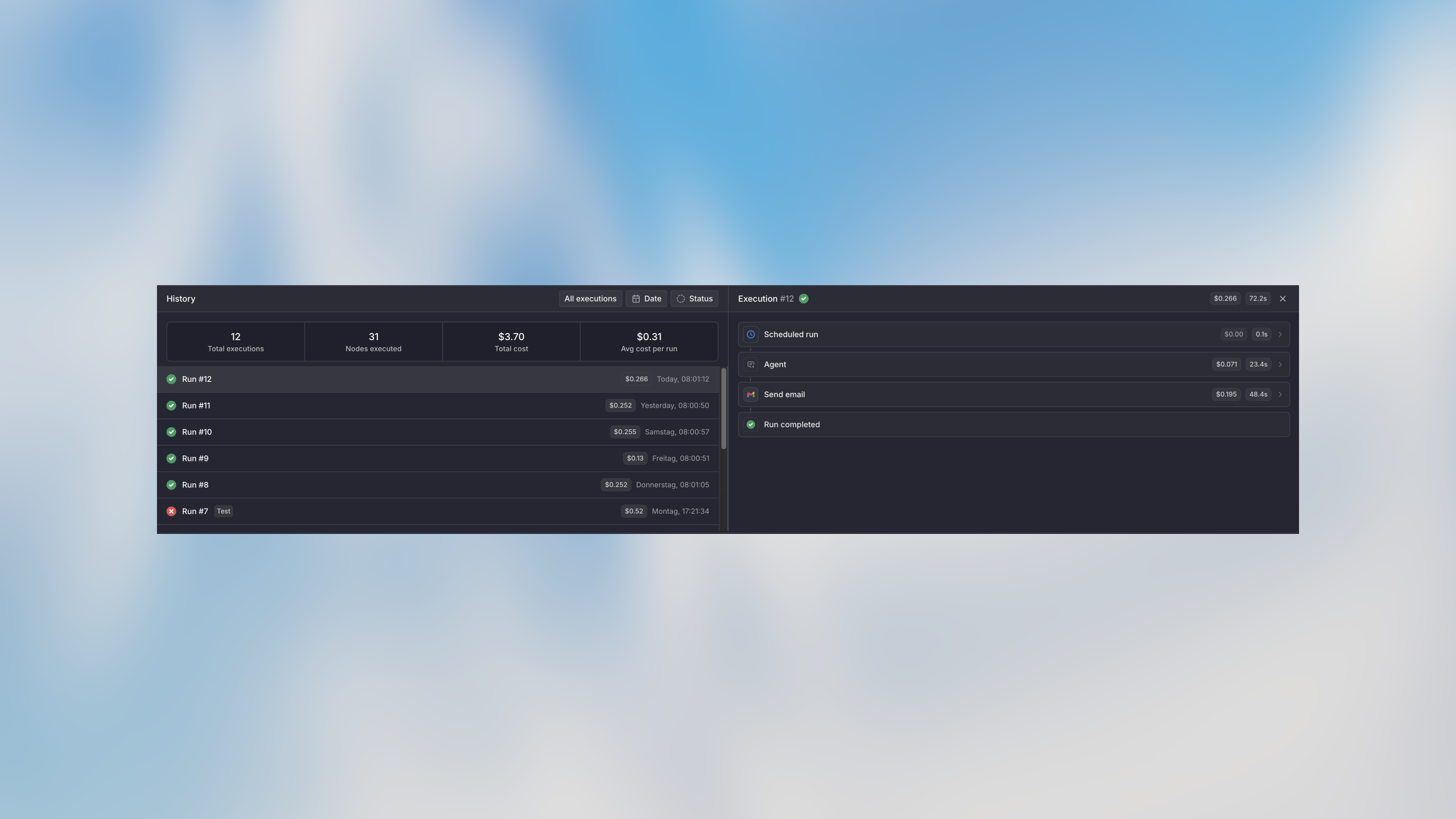
- Click on any run in the history
- See total execution cost
- Click individual nodes to see their cost breakdown
Workflow-Level Costs
The history panel shows aggregate stats:- Total runs
- Nodes executed
- Total cost (all-time)
- Average cost per run
Setting Cost Limits
Monthly cap
Set a maximum spending cap for the workflow per month:- Go to workflow settings
- Set Monthly cap (e.g., $100)
- New runs are blocked when the limit is reached
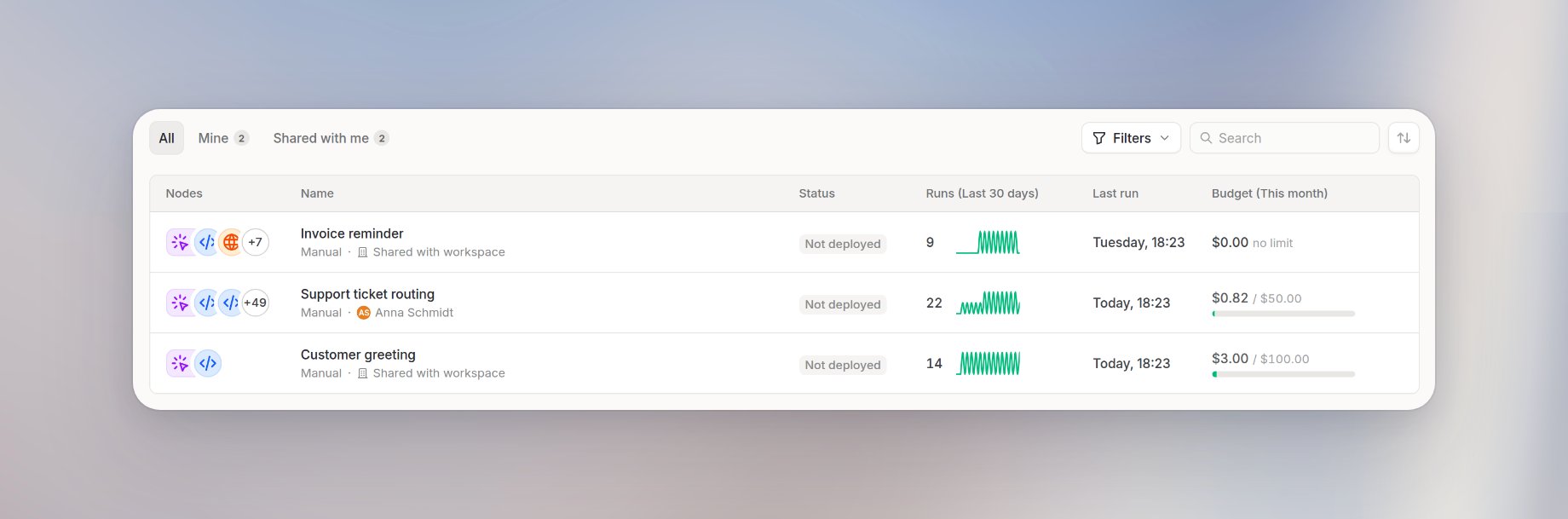
- Progress bar shows current spend vs limit
- The same meter appears in Budget (This month) on the Workflows list
Per-run cap
Prevent runaway costs from a single run:- Set Per-run cap (e.g., $5 per run)
- Run stops if it exceeds this amount
- Useful for catching issues with loops or large data
Max runs per hour
Control how often the workflow can run:- Set Max runs per hour
- Prevents trigger floods from overwhelming your budget
- Useful for webhook-triggered workflows
Alert Thresholds
Get notified before hitting limits:- Add custom alert amounts (e.g., $25, $50)
- Recipients with Spend alerts on get email and inbox when spend crosses each amount
- Built-in alerts at 80% and 95% of monthly limit
Notifications
Choose who is notified in Settings. Selections apply to email and inbox:- Add people under Notifications
- Each recipient starts with Failures and Spend alerts on
- You can turn off one topic per person. Keep at least one on
Cost Limits Hierarchy
Cost limits are enforced at multiple levels. Higher-level limits take precedence:Workspace-Level Limits (Admin)
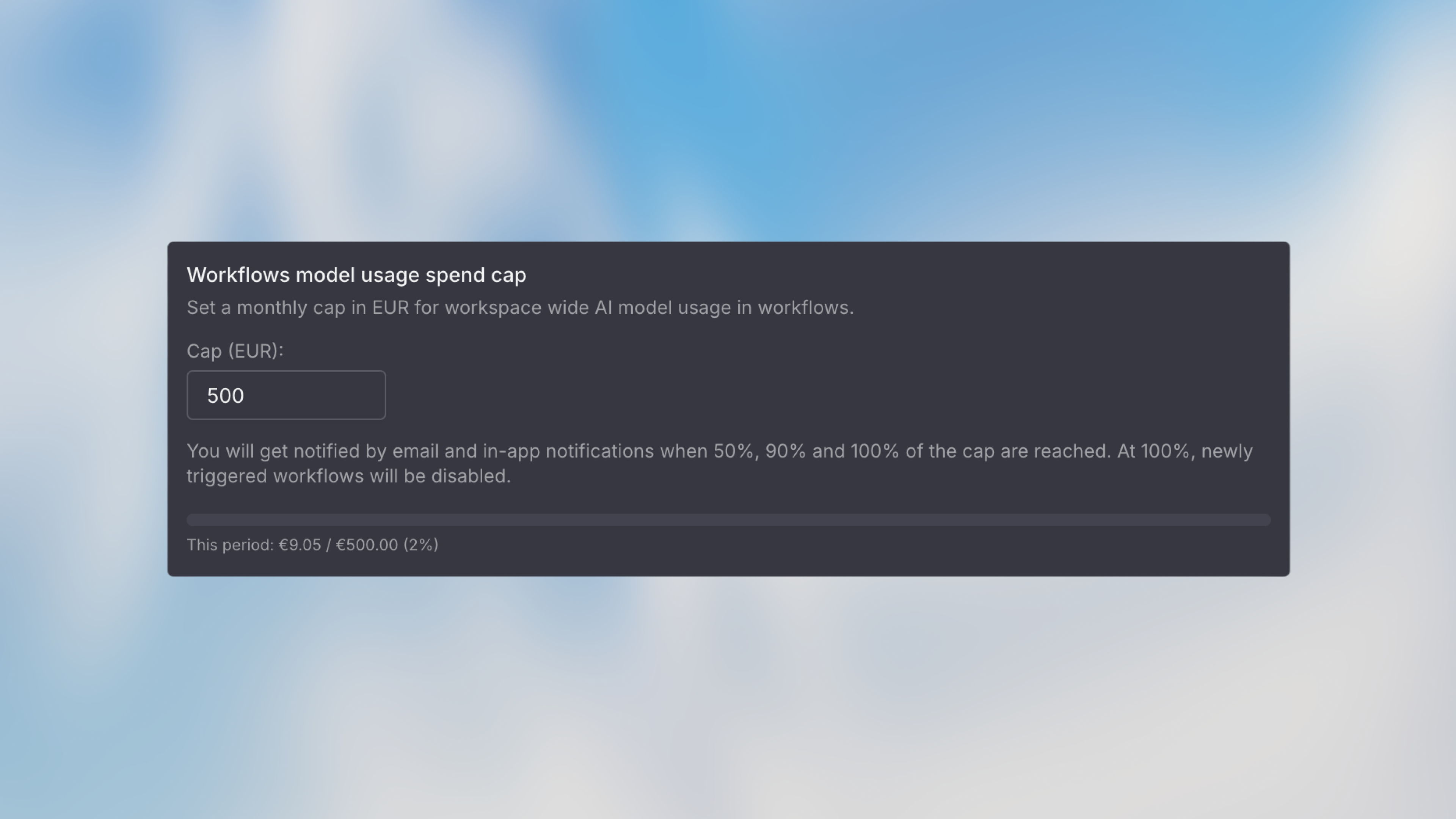
Admins can set workspace-wide limits in Settings → Products → Workflows:
When a workspace-level limit is reached, workflow executions stop regardless of their individual settings.
Admins get an in-app notification and an email when 50%, 90%, and 100% of the workspace spend cap are reached.
On dedicated deployments, the emails are only sent if the deployment is configured for email delivery. The settings also do not show the hint describing these notifications.
Workflow-Level Limits (User)
Users can set limits per workflow (within admin constraints):The workflow monthly limit cannot exceed the admin-configured maximum. If an admin sets the max at $50, users cannot set their workflow limit higher than $50.
Optimization Strategies
Choose the Right Model
Don’t use premium models for simple tasks:Optimize Agent Prompts
Shorter, clearer prompts cost less and work better:Use Code for Simple Transformations
Don’t use AI for tasks that code can handle: Free with Code Node:- Date/time formatting
- Mathematical calculations
- Data filtering and sorting
- String manipulation
- JSON parsing/formatting
Cost-Effective Patterns
Smart Filtering
Filter data before sending to AI:Progressive Enhancement
Start cheap, escalate only if needed:Estimating Costs Before Launch
1. Count Expected Runs
- Forms: Expected submissions per month
- Scheduled: Runs per day × 30
- Webhooks: Events per month from integration
2. Test with Real Data
Run 5-10 tests and check the cost badges:3. Set Appropriate Limits
Next Steps
Agent Node
Understand agent node costs and optimization
Code Node
Use code for free transformations
FAQ
What drives workflow cost?
What drives workflow cost?
Workflow cost depends on model usage, number of runs, selected models, input size, output length, and any AI-heavy nodes. Long prompts, repeated loops, and large retrieved files can increase cost.
How can I reduce workflow cost?
How can I reduce workflow cost?
Use the smallest model that works, keep prompts focused, avoid unnecessary loops, limit large file or knowledge retrieval, and test workflows with sample data before running them at scale.