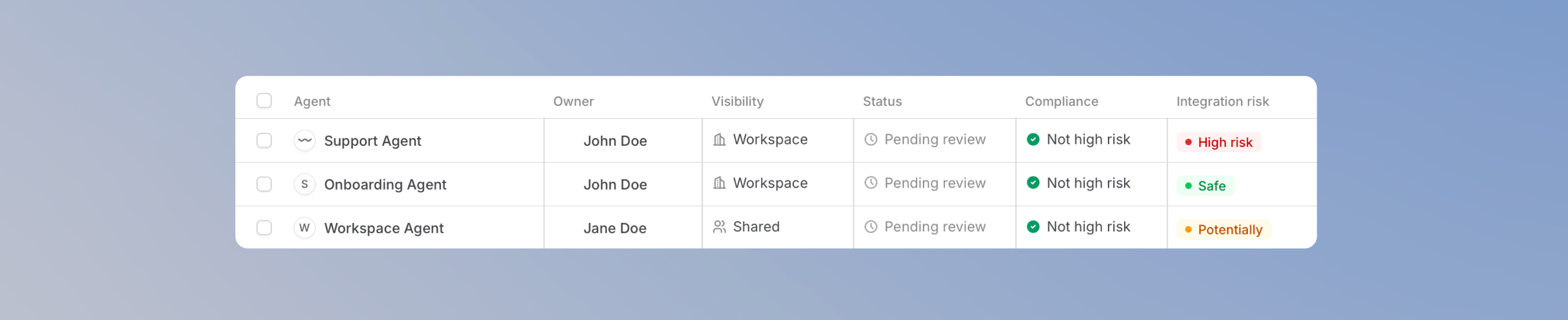
The Agents view is the heart of Governance. It lists the agents you can access and shows you at a glance which ones have been reviewed, which pass your compliance rules, and which carry risk, so you always know where to look first. From here you can open any agent, see exactly how it is configured and used, and take action without leaving Governance.
If your workspace uses Hide private agents and skills from compliance view, only agents shared with others appear here.If you have View governance from a group, you only see agents owned by people in that group. Workspace admins and people with workspace-wide View governance see every agent.
The agent overview
Every agent in the list shows at a glance:
These indicators are assessed automatically. An agent with access to sensitive systems that is shared with the entire workspace carries more risk than a private agent without integrations, so the list points you to the agents worth reviewing first.
Filter the agent list
In a large workspace, you rarely want to scroll through every agent. Use the tabs above the list to focus on the agents that need your attention:
- Pending review shows agents that have not been reviewed yet.
- Needs re-review shows agents that changed since their last review.
- No owner shows agents without an assigned owner. This tab is especially useful when someone leaves your company and their agents need to be reassigned.
- Archived shows agents that have been archived. See Archive Agents.
You can also search the list and filter by visibility, integrations, model, and labels.
The agent detail view
Click any agent to open its detail view. This is a complete picture of the agent, organized into tabs, so you can make review decisions without asking the agent’s editor for context:
- Summary: the agent’s owner, editors, instructions, the model it uses, and the skills and integrations connected to it.
- Checks: the results of your compliance rules for this agent, plus its integration risk with the actions it can use grouped by integration, then by View, Change, and Delete. Change and Delete count as high risk.
- Sharing: who the agent is shared with.
- Analytics: messages, users, and conversations of the agent.
- Costs: what the agent costs to run.
- History: the agent’s versions and past review decisions.
Take action on an agent
After reviewing an agent, you can take a compliance action or archive it. Each action is logged in the agent’s timeline, so your review history stays traceable.
Approve
Approving an agent marks it as reviewed and compliant. The approval is logged in the agent’s timeline. Use this as your default action once you have confirmed an agent meets your standards.
Flag
Flagging marks an agent for follow-up and lets you add a custom note, for example why the agent needs a closer look or what should change. Flags are internal to Governance: the note is not visible to the agent’s editors or users. Use flags to build a review queue for your admin team without alarming the people using the agent.
Disable
Disabling an agent takes it out of use immediately. When you disable an agent, you enter a reason, and the agent’s owner and editors are notified with it. The agent cannot be used again until the editor publishes a new version and it is approved again. This makes disable the right action when an agent violates your policies and needs to be fixed before anyone continues using it.
Unlike a flag, a disable is visible: the owner and editors see your reason, and the agent becomes unusable for everyone until a new version is published and approved. Regular users of the agent do not see the reason.