POST
/
agent
/
v1
/
chat
/
completions
Creates a chat completion with an agent (Vercel AI SDK compatible)
curl --request POST \
  --url https://api.langdock.com/agent/v1/chat/completions \
  --header 'Authorization: Bearer <token>' \
  --header 'Content-Type: application/json' \
  --data '
{
  "agentId": "agent_123",
  "messages": [
    {
      "id": "msg_1",
      "role": "user",
      "parts": [
        {
          "type": "text",
          "text": "Hello, how can you help me?"
        }
      ]
    }
  ],
  "stream": true
}
'
{
  "id": "<string>",
  "role": "assistant",
  "parts": [
    {}
  ],
  "output": "<unknown>"
}
⚠️ Using our API via a dedicated deployment? Just replace api.langdock.com with your deployment’s base URL: <deployment-url>/api/public
Creates a model response for a given agent ID, or pass in an Agent configuration that should be used for your request. This endpoint uses the Vercel AI SDK compatible message format for seamless integration with modern AI applications.
To share an agent with an API key, follow this guide
Vercel AI SDK Compatible: This endpoint uses the Vercel AI SDK’s UIMessage format, making it compatible with the useChat hook and other Vercel AI SDK features.
Using MCP: You can also access your agents via the Langdock MCP Server, which lets MCP-compatible AI clients call your agents directly.

Base URL

https://api.langdock.com/agent/v1/chat/completions

Request Parameters

ParameterTypeRequiredDescription
agentIdstringOne of agentId/agent requiredID of an existing agent to use
agentobjectOne of agentId/agent requiredConfiguration for a temporary agent
messagesarrayYesArray of UIMessage objects (Vercel AI SDK format)
streambooleanNoEnable streaming responses (default: false)
outputobjectNoStructured output format specification
maxStepsintegerNoMaximum number of tool steps (1-20)
imageResponseFormatstringNoResponse format for agent-generated images. "url" returns a signed URL, "b64_json" returns base64-encoded image data.

Message Format (Vercel AI SDK UIMessage)

The Agents API uses the Vercel AI SDK’s UIMessage format for maximum compatibility with modern AI frameworks.

UIMessage Structure

Each message in the messages array should contain:
interface UIMessage {
  id: string;           // Unique identifier for this message
  role: 'system' | 'user' | 'assistant';
  parts: MessagePart[]; // Array of message parts
  metadata?: {          // Optional metadata
    attachments?: string[];  // Array of attachment UUIDs
  };
}

Message Part Types

User message parts (for sending):
TypeFieldsDescription
texttype: "text", text: stringPlain text content
filetype: "file", mediaType: string, url: string, filename?: stringInline file reference
Agent message parts (returned in responses — include in conversation history when sending follow-up messages):
TypeKey FieldsDescription
texttype: "text", text: stringText response
reasoningtype: "reasoning", text: stringModel reasoning / chain-of-thought
tool-{name}type: "tool-{name}", toolCallId: string, state: "input-streaming" | "input-available" | "output-available" | "output-error", input?: any, output?: any, errorText?: stringTool call and result
source-urltype: "source-url", sourceId: string, url: string, title?: stringWeb source reference
source-documenttype: "source-document", sourceId: string, mediaType: string, title: string, filename?: stringDocument source reference

Example Messages

User Message with Text

{
  id: "msg_1",
  role: "user",
  parts: [
    {
      type: "text",
      text: "Hello, how are you?"
    }
  ]
}

User Message with Attachment

{
  id: "msg_2",
  role: "user",
  parts: [
    {
      type: "text",
      text: "Please analyze this document"
    }
  ],
  metadata: {
    attachments: ["550e8400-e29b-41d4-a716-446655440000"]
  }
}
To attach files to a message, upload them via the Upload Attachment API and reference the returned UUIDs in the message’s metadata.attachments array. Do not use type: "file" parts for uploaded attachments — that format is reserved for inline file references (e.g., data URIs).

Agent Message with Tool Call

{
  id: "msg_3",
  role: "assistant",
  parts: [
    {
      type: "tool-webSearch",
      toolCallId: "call_123",
      state: "output-available",
      input: {
        query: "latest news"
      },
      output: { /* search results */ }
    }
  ]
}

Agent Configuration

When creating a temporary agent using the agent parameter, you can specify:
  • name - Name of the agent (max 64 chars)
  • instructions - System instructions (max 16384 chars)
  • description - Optional description (max 256 chars)
  • temperature - Temperature between 0-1
  • model - Model ID to use (see Available Models for options)
  • capabilities - Enable features like web search, data analysis, image generation, canvas
  • knowledgeFolderIds - IDs of knowledge folders to use
  • attachmentIds - Array of UUID strings identifying attachments to use
You can retrieve a list of available models using the Models API.
The inline agent configuration field names differ from the Create and Update Agent APIs. In particular, this endpoint uses instructions (plural) and temperature, while the CRUD endpoints use instruction (singular) and creativity. The completions endpoint also accepts a nested capabilities object, while the CRUD endpoints use flat boolean fields.
attachmentIds in the inline agent configuration is currently not functional — the agent will not be able to read the attached files. Instead, use metadata.attachments on individual messages to reference uploaded files per-message, or create a persistent agent with the attachments field via the Create Agent API.

Using Tools via API

When an agent has tools configured (called “Actions” in the Langdock UI), it will automatically use them to respond to API requests when appropriate. The connection must be set to “preselected connection” (shared with other users) for tool authentication to work.
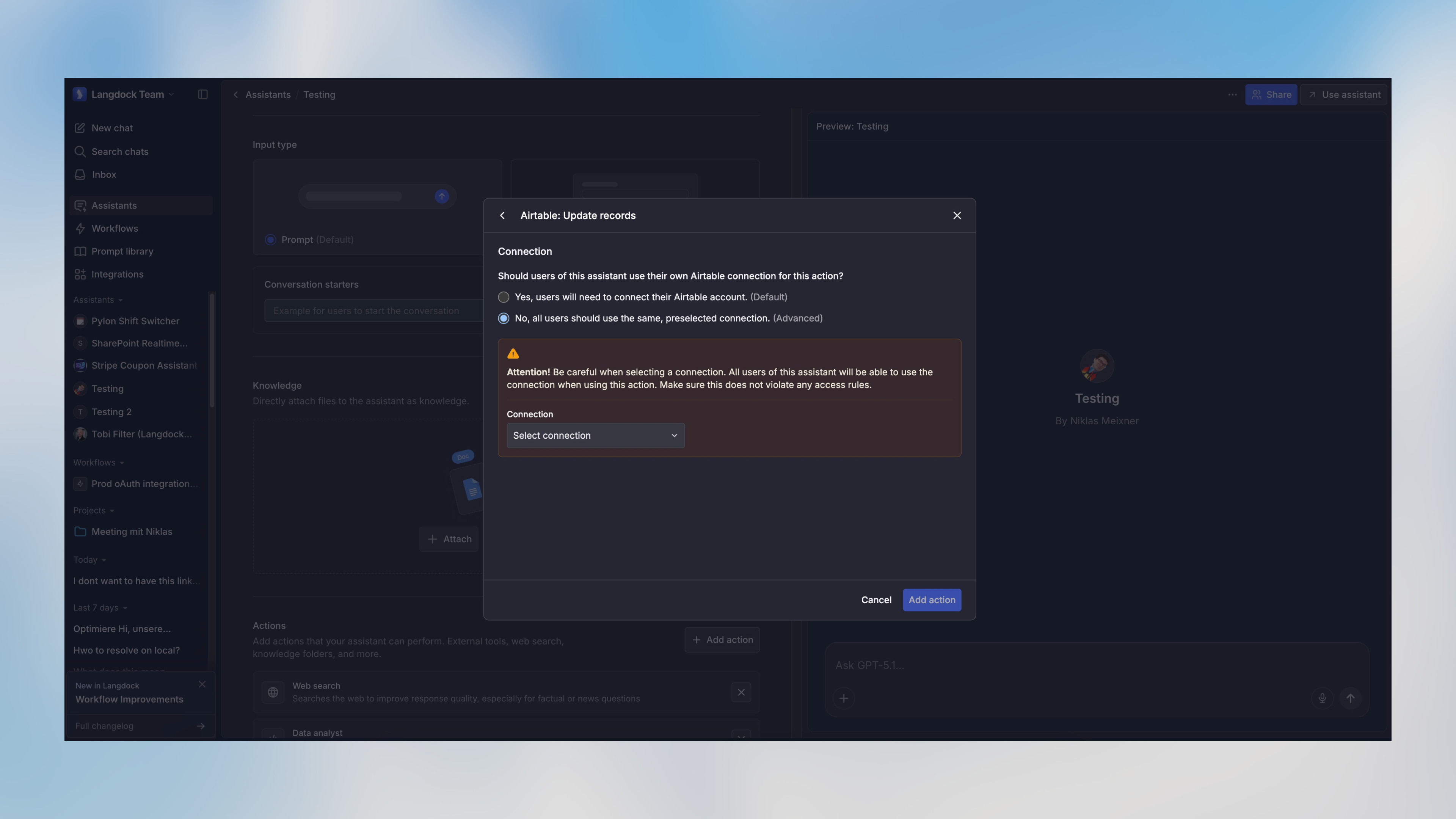
Preselected connection setting in agent configuration
Tools with “Require human confirmation” enabled do not work via API—they require manual approval in the Langdock UI. To use a tool via API, disable this setting in the agent configuration.

Structured Output

You can specify a structured output format using the optional output parameter:
FieldTypeDescription
type”object” | “array” | “enum”The type of structured output
schemaobjectJSON Schema definition for the output (for object/array types)
enumstring[]Array of allowed values (for enum type)
The output parameter behavior depends on the specified type:
  • type: "object" with no schema: Forces the response to be a single JSON object (no specific structure)
  • type: "object" with schema: Forces the response to match the provided JSON Schema
  • type: "array" with schema: Forces the response to be an array of objects matching the provided schema
  • type: "enum": Forces the response to be one of the values specified in the enum array
You can use tools like easy-json-schema to generate JSON Schemas from example JSON objects.

Streaming Responses

When stream is set to true, the API returns a stream using the Vercel AI SDK streaming format, compatible with the useChat hook and other Vercel AI SDK features.

Using with Vercel AI SDK useChat Hook

'use client';

import { useChat } from '@ai-sdk/react';

export default function Chat() {
  const { messages, input, handleInputChange, handleSubmit } = useChat({
    api: 'https://api.langdock.com/agent/v1/chat/completions',
    headers: {
      'Authorization': `Bearer ${process.env.NEXT_PUBLIC_LANGDOCK_API_KEY}`
    },
    body: {
      agentId: 'your-agent-id'
    }
  });

  return (
    <div>
      {messages.map(m => (
        <div key={m.id}>
          {m.role === 'user' ? 'User: ' : 'AI: '}
          {m.content}
        </div>
      ))}

      <form onSubmit={handleSubmit}>
        <input
          value={input}
          placeholder="Say something..."
          onChange={handleInputChange}
        />
      </form>
    </div>
  );
}

Manual Stream Handling

const response = await fetch('https://api.langdock.com/agent/v1/chat/completions', {
  method: 'POST',
  headers: {
    'Authorization': 'Bearer YOUR_API_KEY',
    'Content-Type': 'application/json',
  },
  body: JSON.stringify({
    agentId: 'agent_123',
    messages: [
      {
        id: 'msg_1',
        role: 'user',
        parts: [{ type: 'text', text: 'Hello' }]
      }
    ],
    stream: true
  }),
});

const reader = response.body.getReader();
const decoder = new TextDecoder();

while (true) {
  const { done, value } = await reader.read();
  if (done) break;

  const chunk = decoder.decode(value);
  console.log(chunk);  // Process streaming chunks
}

Obtaining Attachment IDs

To use attachments in your agent conversations, first upload the files using the Upload Attachment API. This returns an attachmentId (UUID) for each file. You can then use attachments in two ways:
  1. Per-message (recommended): Include the attachment UUIDs in the message’s metadata.attachments array. This lets you reference different files in different messages within the same conversation.
  2. Agent-level: Include the UUIDs in the attachments array when creating or updating a persistent agent. All messages sent to that agent will have access to these files.

Response Format

The API returns a JSON object containing a messages array with the agent’s response:
interface CompletionResponse {
  messages: Array<{
    id: string;
    role: "assistant";
    content: string;
  }>;

  // Structured output - included when requested
  output?: object | array | string;
}

Standard Response

The response contains a messages array. Each message has:
  • id - Unique identifier for the message
  • role - Always "assistant" for completion responses
  • content - The agent’s text response as a plain string

Structured Output

When the request includes an output parameter, the response will automatically include an output field containing the formatted structured data. The type of this field depends on the requested output format:
  • If output.type was “object”: Returns a JSON object (with schema validation if schema was provided)
  • If output.type was “array”: Returns an array of objects matching the provided schema
  • If output.type was “enum”: Returns a string matching one of the provided enum values

Examples

Using an Existing Agent with Attachment

const response = await fetch(
  "https://api.langdock.com/agent/v1/chat/completions",
  {
    method: "POST",
    headers: {
      "Authorization": "Bearer YOUR_API_KEY",
      "Content-Type": "application/json"
    },
    body: JSON.stringify({
      agentId: "agent_123",
      messages: [
        {
          id: "msg_1",
          role: "user",
          parts: [
            {
              type: "text",
              text: "Can you analyze this document for me?"
            }
          ],
          metadata: {
            attachments: ["550e8400-e29b-41d4-a716-446655440000"]
          }
        }
      ]
    })
  }
);

const data = await response.json();
const responseText = data.messages[0].content;
console.log(responseText);

Using a Temporary Agent Configuration

const response = await fetch(
  "https://api.langdock.com/agent/v1/chat/completions",
  {
    method: "POST",
    headers: {
      "Authorization": "Bearer YOUR_API_KEY",
      "Content-Type": "application/json"
    },
    body: JSON.stringify({
      agent: {
        name: "Document Analyzer",
        instructions: "You are a helpful agent who analyzes documents and answers questions about them",
        temperature: 0.7,
        model: "gpt-5",
        capabilities: {
          webSearch: true,
          dataAnalyst: true
        }
      },
      messages: [
        {
          id: "msg_1",
          role: "user",
          parts: [
            {
              type: "text",
              text: "What are the key points in the document?"
            }
          ]
        }
      ]
    })
  }
);

const data = await response.json();
console.log(data);

Using Structured Output with Schema

const response = await fetch(
  "https://api.langdock.com/agent/v1/chat/completions",
  {
    method: "POST",
    headers: {
      "Authorization": "Bearer YOUR_API_KEY",
      "Content-Type": "application/json"
    },
    body: JSON.stringify({
      agent: {
        name: "Weather Agent",
        instructions: "You are a helpful weather agent",
        model: "gpt-5",
        capabilities: {
          webSearch: true
        }
      },
      messages: [
        {
          id: "msg_1",
          role: "user",
          parts: [
            {
              type: "text",
              text: "What's the weather in Paris, Berlin and London today?"
            }
          ]
        }
      ],
      output: {
        type: "array",
        schema: {
          type: "object",
          properties: {
            weather: {
              type: "object",
              properties: {
                city: { type: "string" },
                tempInCelsius: { type: "number" },
                tempInFahrenheit: { type: "number" }
              },
              required: ["city", "tempInCelsius", "tempInFahrenheit"]
            }
          }
        }
      }
    })
  }
);

const data = await response.json();
console.log(data.output);
// Output:
// [
//   { "weather": { "city": "Paris", "tempInCelsius": 1, "tempInFahrenheit": 33 } },
//   { "weather": { "city": "Berlin", "tempInCelsius": 1, "tempInFahrenheit": 35 } },
//   { "weather": { "city": "London", "tempInCelsius": 7, "tempInFahrenheit": 45 } }
// ]

Using with Next.js Server Actions

// app/actions.ts
'use server';

import { generateId } from 'ai';

export async function chatWithAgent(message: string) {
  const response = await fetch(
    'https://api.langdock.com/agent/v1/chat/completions',
    {
      method: 'POST',
      headers: {
        'Authorization': `Bearer ${process.env.LANGDOCK_API_KEY}`,
        'Content-Type': 'application/json'
      },
      body: JSON.stringify({
        agentId: process.env.AGENT_ID,
        messages: [
          {
            id: generateId(),
            role: 'user',
            parts: [
              {
                type: 'text',
                text: message
              }
            ]
          }
        ]
      })
    }
  );

  const data = await response.json();
  return data.messages[0].content;
}

Rate Limits

The rate limit for the Agents Completions endpoint is 500 RPM (requests per minute) and 60,000 TPM (tokens per minute). Rate limits are defined at the workspace level - not at an API key level. Each model has its own rate limit. If you exceed your rate limit, you will receive a 429 Too Many Requests response. Please note that the rate limits are subject to change. Refer to this documentation for the most up-to-date information.

Error Handling

try {
  const response = await fetch('https://api.langdock.com/agent/v1/chat/completions', options);

  if (!response.ok) {
    const error = await response.json();
    throw new Error(error.message || 'Request failed');
  }

  const data = await response.json();
  // Process response
} catch (error) {
  console.error('Error:', error.message);
}
Common error status codes:
  • 400 - Invalid request parameters, malformed message format, agent not found, or agent not shared with API key
  • 401 - Invalid or missing API key
  • 429 - Rate limit exceeded
  • 500 - Server error
Langdock intentionally blocks browser-origin requests to protect your API key and ensure your applications remain secure. For more information, please see our guide on API Key Best Practices.

Authorizations

Authorization
string
header
required

API key as Bearer token. Format "Bearer YOUR_API_KEY"

Body

application/json
agentId
string
required

ID of an existing agent to use

messages
object[]
required

Array of UIMessage objects (Vercel AI SDK format)

stream
boolean
default:false
output
object

Specification for structured output format. When type is object/array and no schema is provided, the response will be JSON but can have any structure. When the type is enum, you must provide an enum parameter with an array of strings as options.

imageResponseFormat
enum<string>

Response format for images generated by the agent. "url" returns a signed URL, "b64_json" returns base64-encoded image data.

Available options:
url,
b64_json

Response

Successful chat completion

UIMessage response (Vercel AI SDK format)

id
string
required
role
enum<string>
required
Available options:
assistant
parts
object[]
required
output
any

Structured output if requested