> ## Documentation Index
> Fetch the complete documentation index at: https://docs.langdock.com/llms.txt
> Use this file to discover all available pages before exploring further.
# Human in the Loop
> Pause workflow execution and require manual approval before proceeding.
## Overview
Human in the Loop (HITL) allows you to pause workflow execution and require manual approval before proceeding. When a workflow reaches an approval step, it stops and waits for someone with editor access to review and approve before continuing.
## How It Works
When a workflow reaches an approval step:
1. Workflow pauses execution
2. Editors receive a notification
3. An editor reviews the details and approves to continue
4. Workflow resumes and executes the next steps
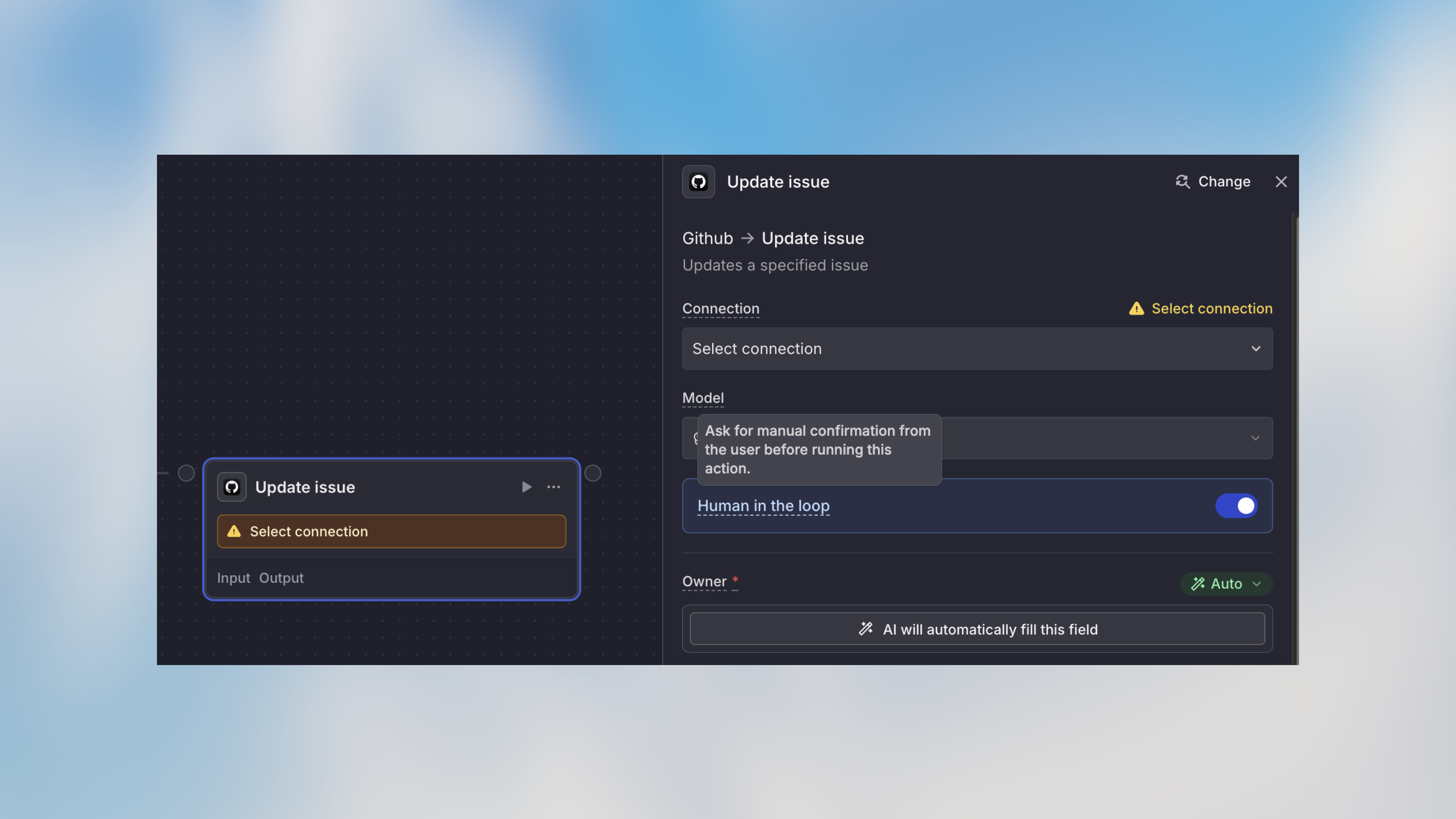 Anyone with **editor** access to the workflow can approve paused runs. Share editor access with team members who need approval rights.
## Example Use Cases
### Financial Transactions
```text theme={null}
Trigger: Invoice received
→ Agent: Extract invoice details
→ Approval: Review payment
└─ Shows: Payment amount and vendor
→ Action: Create payment
→ Notification: Confirm payment processed
```
**Why approval needed:** Financial transactions should have oversight, especially for amounts over a certain threshold.
### Data Deletion
```text theme={null}
Trigger: Cleanup request
→ HTTP Request: Fetch old records
→ Code: Filter records older than 90 days
→ Approval: Review deletion
└─ Shows: Record count and preview
→ Action: Delete records
→ Notification: Confirm deletion complete
```
**Why approval needed:** Data deletion is irreversible and requires verification.
### Customer Communications
```text theme={null}
Trigger: Form submission
→ Agent: Generate response
→ Approval: Review message
└─ Shows: Email draft generated by agent
→ Action: Send email to customer
→ Notification: Email sent confirmation
```
**Why approval needed:** Customer-facing communications represent your brand and may need quality review.
### Production Changes
```text theme={null}
Trigger: Manual or scheduled
→ Agent: Review configuration changes
→ Approval: Review deployment
└─ Shows: Change summary
→ Action: Update production system
→ Notification: Deployment complete
```
**Why approval needed:** Production changes carry risk and benefit from review.
## When to Use Human in the Loop
**✅ Good use cases:**
* Financial transactions over a threshold
* Data deletions or irreversible operations
* Customer communications requiring review
* Production system changes
* Compliance-sensitive actions
* High-value decisions
**❌ Avoid for:**
* Routine, low-risk actions
* Steps that need to run immediately
* Actions that happen frequently throughout the day
* Workflows where manual approval becomes a bottleneck
## Combining with Conditions
Smart approval workflows use conditions to require approval only when needed:
```text theme={null}
Agent: Calculate invoice amount
Condition: Amount > $5000?
├─ Yes → Approval: Review high-value payment
│ → Action: Create payment
└─ No → Action: Create payment (auto-approved)
```
This pattern gives you:
* Automation for routine cases
* Oversight for exceptional cases
* Efficient use of your time
## Best Practices
Don't require approval for every step—focus on actions with real risk or significant impact. Too many approvals slow down automation benefits.
Ensure the workflow provides enough information at the approval step. Include relevant details like amounts, recipients, or data previews so you can make informed decisions.
Consider who has editor access and can approve. For time-sensitive workflows, ensure someone on the team can respond promptly.
Run test workflows to ensure approval notifications arrive correctly and you have the information needed to approve confidently.
## Next Steps
Get notified when approval is needed
Add conditional logic to your workflows
Build your first workflow
Understand workflow fundamentals
## FAQ
Use Human in the Loop when a workflow should pause for review, approval, or manual input before continuing. It is useful for sensitive actions, quality checks, approvals, and workflows where users must make a decision.
Check who needs to approve or complete the step, whether they received the request, and whether the workflow is waiting for required input. Also confirm that downstream nodes have access to the data produced by the approval step.
Anyone with **editor** access to the workflow can approve paused runs. Share editor access with team members who need approval rights.
## Example Use Cases
### Financial Transactions
```text theme={null}
Trigger: Invoice received
→ Agent: Extract invoice details
→ Approval: Review payment
└─ Shows: Payment amount and vendor
→ Action: Create payment
→ Notification: Confirm payment processed
```
**Why approval needed:** Financial transactions should have oversight, especially for amounts over a certain threshold.
### Data Deletion
```text theme={null}
Trigger: Cleanup request
→ HTTP Request: Fetch old records
→ Code: Filter records older than 90 days
→ Approval: Review deletion
└─ Shows: Record count and preview
→ Action: Delete records
→ Notification: Confirm deletion complete
```
**Why approval needed:** Data deletion is irreversible and requires verification.
### Customer Communications
```text theme={null}
Trigger: Form submission
→ Agent: Generate response
→ Approval: Review message
└─ Shows: Email draft generated by agent
→ Action: Send email to customer
→ Notification: Email sent confirmation
```
**Why approval needed:** Customer-facing communications represent your brand and may need quality review.
### Production Changes
```text theme={null}
Trigger: Manual or scheduled
→ Agent: Review configuration changes
→ Approval: Review deployment
└─ Shows: Change summary
→ Action: Update production system
→ Notification: Deployment complete
```
**Why approval needed:** Production changes carry risk and benefit from review.
## When to Use Human in the Loop
**✅ Good use cases:**
* Financial transactions over a threshold
* Data deletions or irreversible operations
* Customer communications requiring review
* Production system changes
* Compliance-sensitive actions
* High-value decisions
**❌ Avoid for:**
* Routine, low-risk actions
* Steps that need to run immediately
* Actions that happen frequently throughout the day
* Workflows where manual approval becomes a bottleneck
## Combining with Conditions
Smart approval workflows use conditions to require approval only when needed:
```text theme={null}
Agent: Calculate invoice amount
Condition: Amount > $5000?
├─ Yes → Approval: Review high-value payment
│ → Action: Create payment
└─ No → Action: Create payment (auto-approved)
```
This pattern gives you:
* Automation for routine cases
* Oversight for exceptional cases
* Efficient use of your time
## Best Practices
Don't require approval for every step—focus on actions with real risk or significant impact. Too many approvals slow down automation benefits.
Ensure the workflow provides enough information at the approval step. Include relevant details like amounts, recipients, or data previews so you can make informed decisions.
Consider who has editor access and can approve. For time-sensitive workflows, ensure someone on the team can respond promptly.
Run test workflows to ensure approval notifications arrive correctly and you have the information needed to approve confidently.
## Next Steps
Get notified when approval is needed
Add conditional logic to your workflows
Build your first workflow
Understand workflow fundamentals
## FAQ
Use Human in the Loop when a workflow should pause for review, approval, or manual input before continuing. It is useful for sensitive actions, quality checks, approvals, and workflows where users must make a decision.
Check who needs to approve or complete the step, whether they received the request, and whether the workflow is waiting for required input. Also confirm that downstream nodes have access to the data produced by the approval step.