> ## Documentation Index
> Fetch the complete documentation index at: https://docs.langdock.com/llms.txt
> Use this file to discover all available pages before exploring further.
# Roles and extra permissions
> Compose workspace access from system roles, custom roles, and extra permissions so people can use products without becoming admins.
Compose access from a system role, optional custom roles, and optional extra permissions. People who keep their current role are unchanged. Admin always has every permission.
This page is available to workspace admins.
## System roles
Member, Editor, and Admin come with the workspace and cannot be deleted.
* Member: default access for daily work
* Editor: create and share most products, without workspace settings
* Admin: every permission, including workspace settings and user management
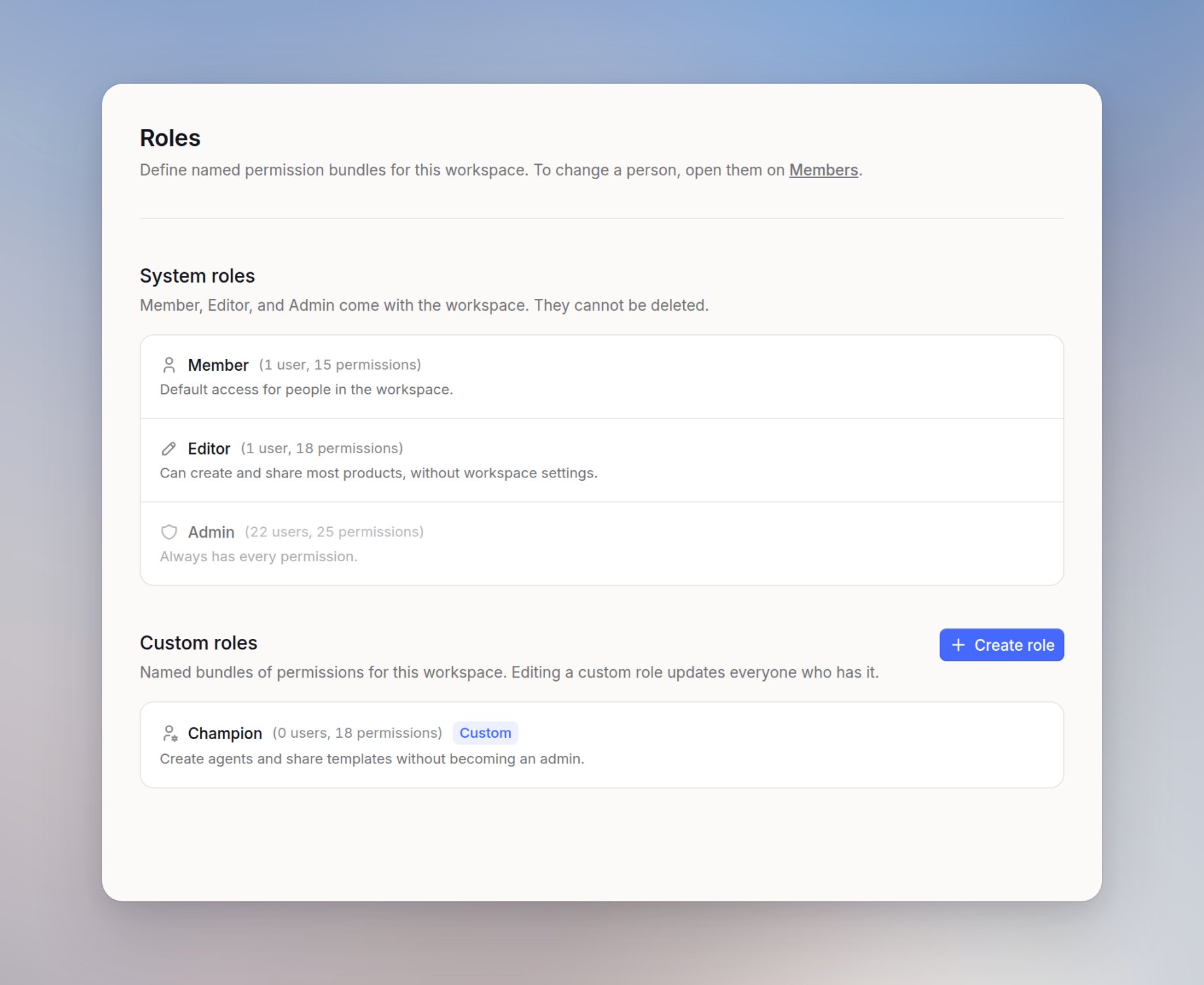
Open the workspace menu, select **Workspace settings**, then under **User management** open [**Roles**](https://app.langdock.com/settings/workspace/user-management/roles).
Open a role to see permissions grouped by area, and turn on only what that role should include. Editing a role updates everyone who has it. Admin always has every permission and cannot be reduced.
The permission catalog is on [Permission Recommendations](/en/admin/workspace/permissions).
## Create a custom role
Use a custom role when several people need the same extra access. You can create up to 5 custom roles.
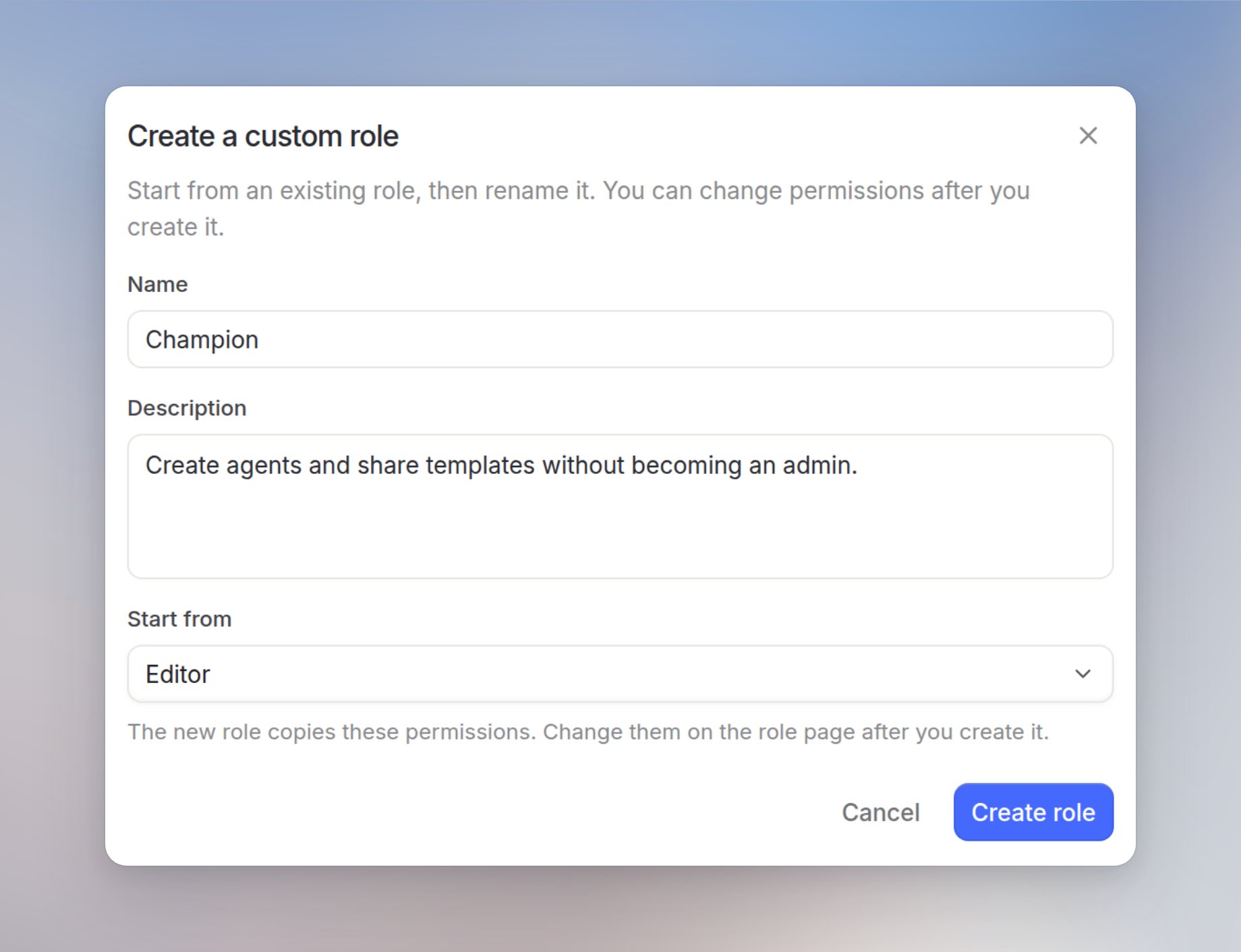
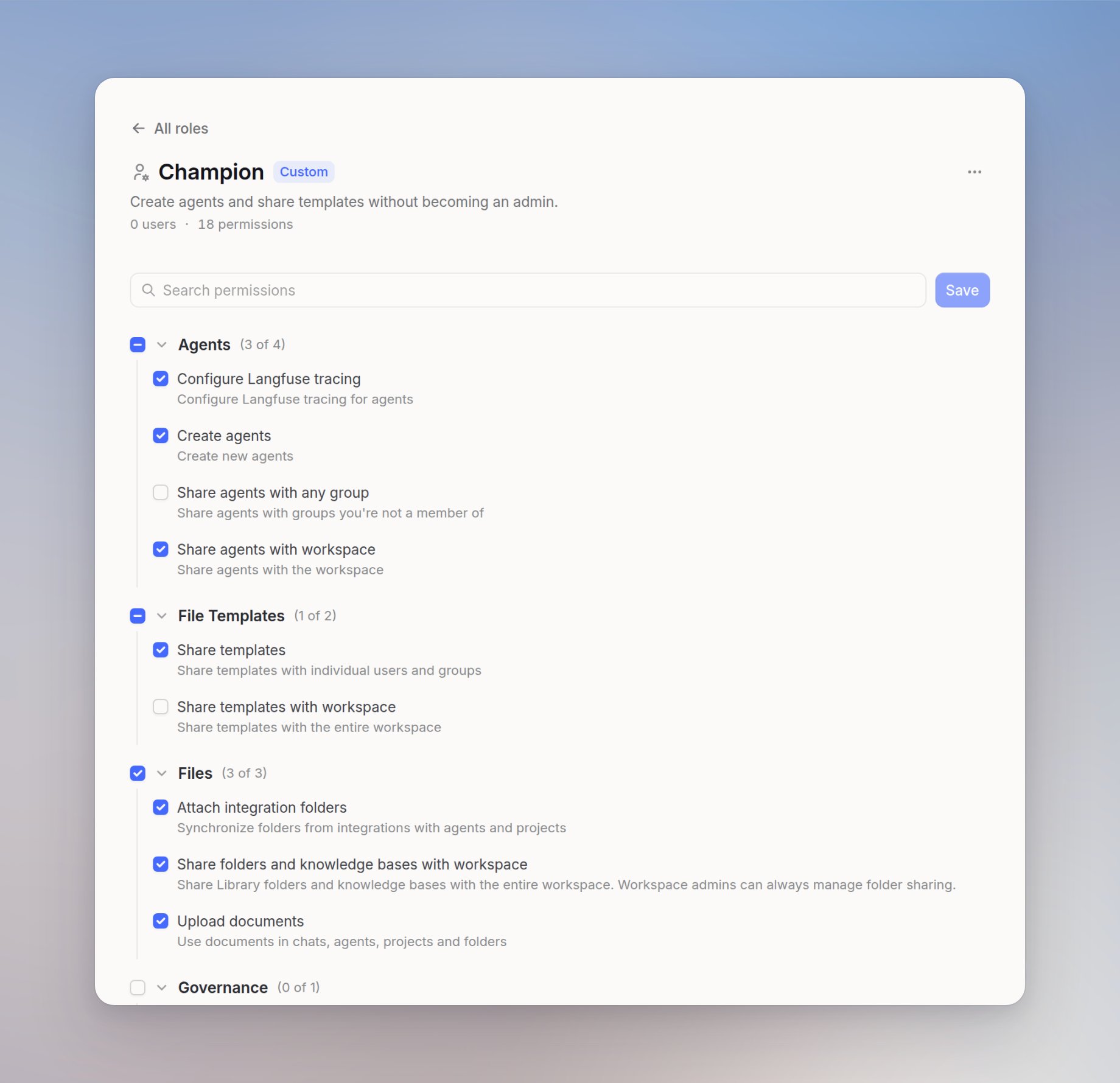
A few AI champions should create agents and share templates without becoming admins. Create a Champion role, then assign it on [**Members**](https://app.langdock.com/settings/workspace/user-management/members). If usage gets too high, turn that permission off on the role. Everyone with Champion loses it at once.
On [**Roles**](https://app.langdock.com/settings/workspace/user-management/roles), under **Custom roles**, click **Create role**. The **Create a custom role** dialog opens.
Choose **Start from** Member or Editor. The dialog defaults to Editor. The new role copies those permissions. Enter a **Name**. The placeholder is "For example, Governor". Add a **Description** if you want, then click **Create role**.
On the role page, turn permissions on by area. Duplicate permission bundles are blocked.
## Give someone a role or an extra permission
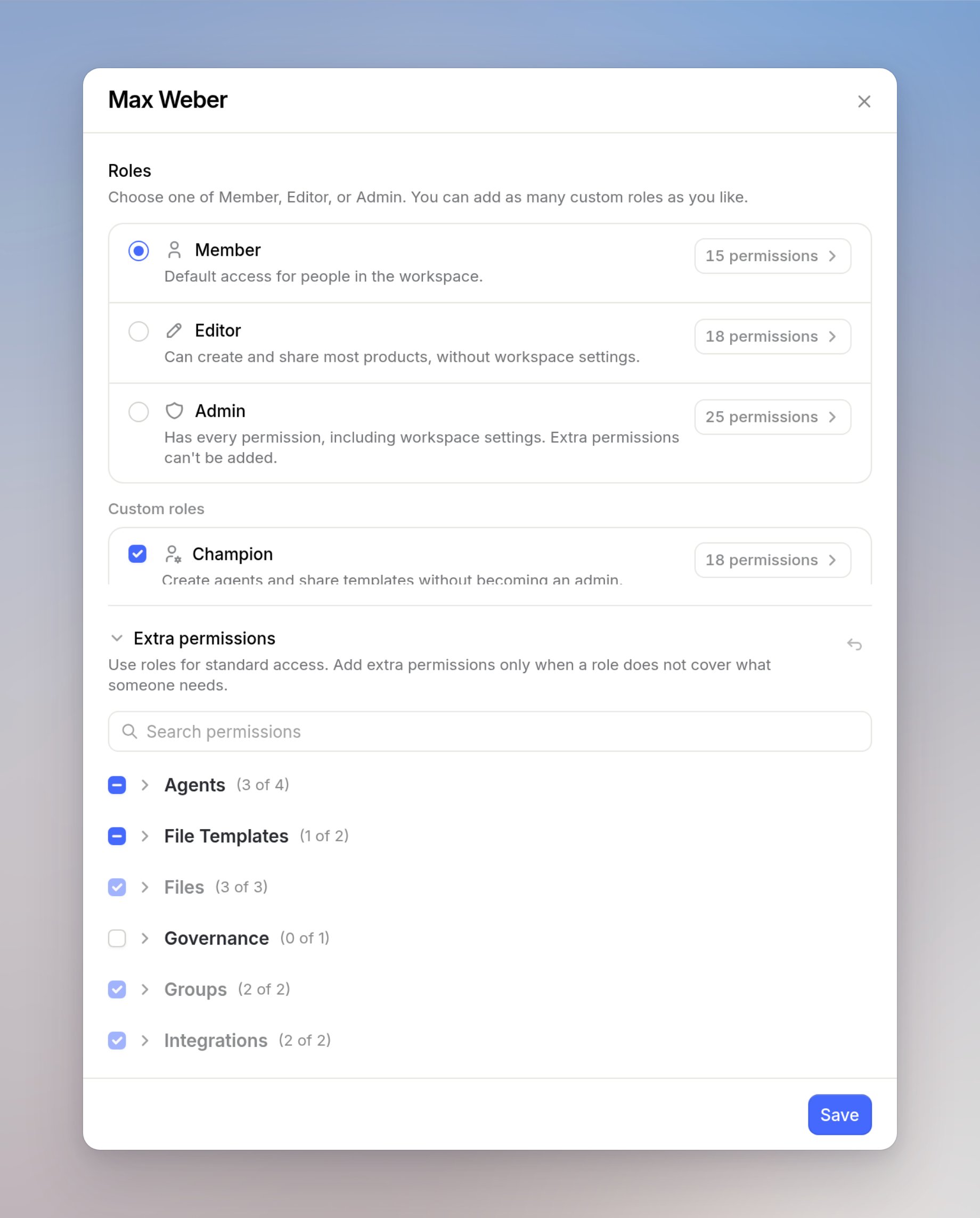
On [**Members**](https://app.langdock.com/settings/workspace/user-management/members), click the person's role. The **Edit access** drawer opens.
Keep one of Member, Editor, or Admin. You can add as many custom roles as you like. **Extra permissions** are one-off access on top of their roles.
Rows that already come from a role show **Granted by** that role, **Also in** that role, or **Direct**. If extras get large, you'll see **Use a role instead**. Promoting someone to Admin clears custom roles and extras. **Admin already includes every permission.**
Click **Save** when you are done.
## Group permissions
Workspace roles and extras apply to a person across the workspace. Groups have their own roles. Those are not the same as Member, Editor, or Admin on [**Members**](https://app.langdock.com/settings/workspace/user-management/members).
Open [**Groups**](https://app.langdock.com/settings/workspace/user-management/groups).
### Group roles
Group roles only apply inside that group. They do not open workspace settings.
* Member can use things shared with the group
* Editor can share things with the group
* Admin can do that, plus change group roles and promote people in the group
A group Admin is not a workspace admin.
### Group leader
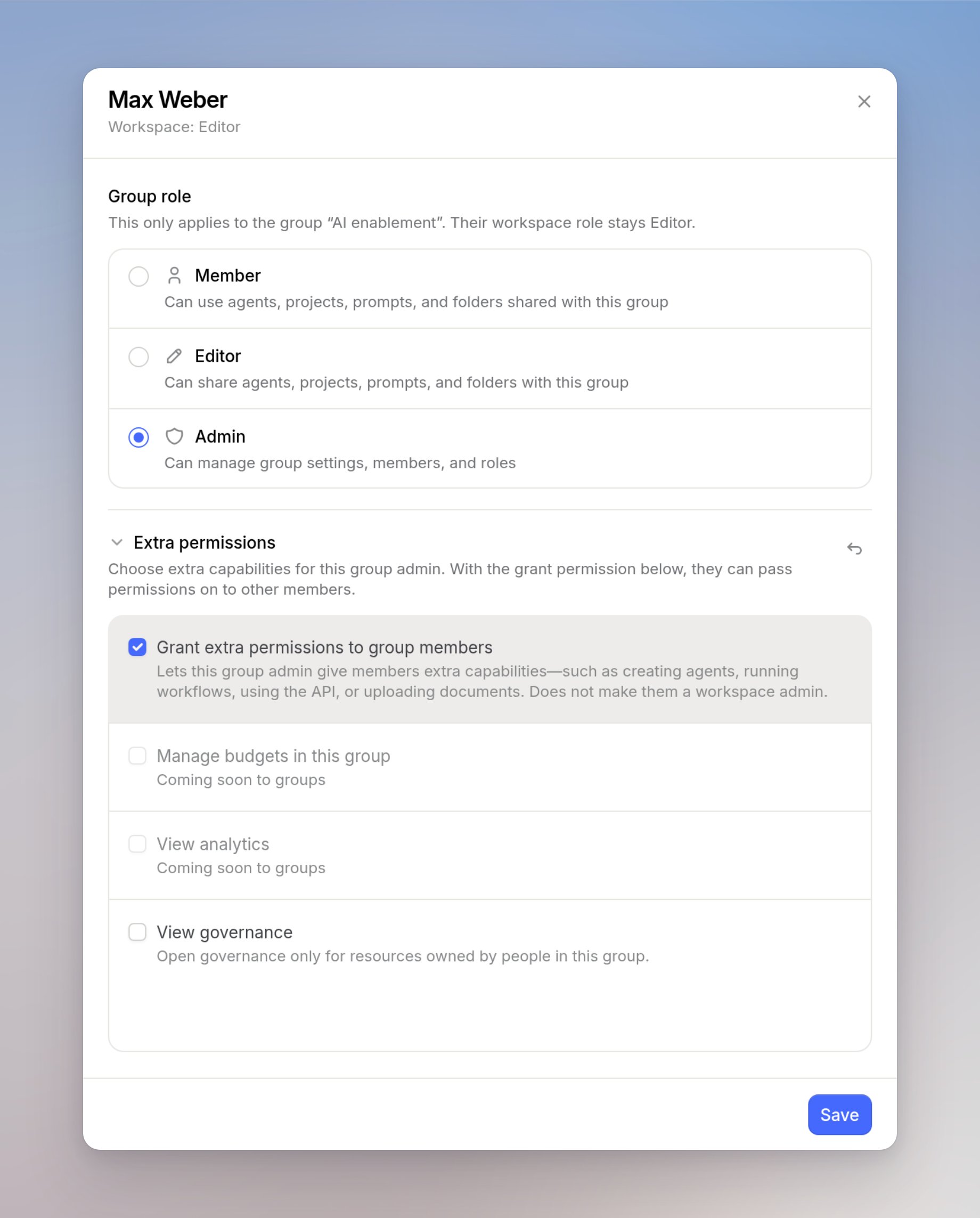
A group leader is a group Admin with **Grant extra permissions to group members**. They can then grant **Product permissions** to people in that group, such as **Create agents** or **Share templates**.
They can grant only to people in that group. Those product permissions then apply across the workspace, not only in the group.
They cannot open workspace [**Members**](https://app.langdock.com/settings/workspace/user-management/members) or [**Roles**](https://app.langdock.com/settings/workspace/user-management/roles), cannot create custom roles, and cannot assign the workspace Editor or Admin role. They cannot turn a product on or off for the workspace. They can still change group roles.
If a product is already on, they can grant it to people in their group, including expensive ones such as Workflows. Give this only to people you trust with that control.
If you want several people to have the same extras, and you want to take those extras away in one place, use a [custom role](#create-a-custom-role) instead. A group leader can grant the same access again.
You can also grant **View governance** on a group. That opens [Governance](/en/admin/governance/overview) only for resources owned by people in the group. Sharing the group is not enough.
Rows the person already has show **Already from their workspace role**.
### Give a group leader product access
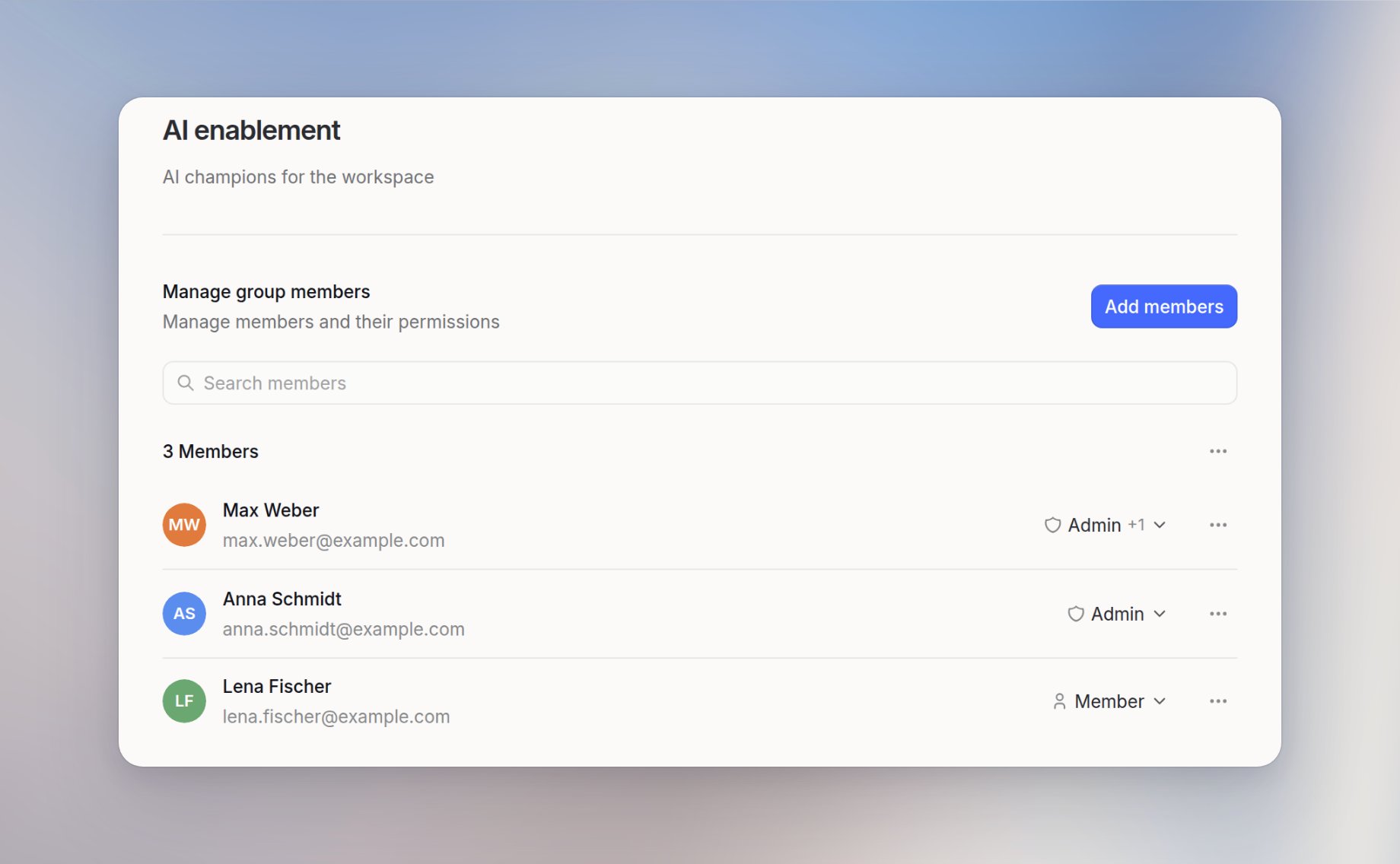
A company of a few hundred people has an AI enablement group. Anna stays workspace admin. Max is in that group. He should grant **Create agents** to people in the group, without billing or workspace settings.
On [**Groups**](https://app.langdock.com/settings/workspace/user-management/groups), open the group. Anna and Max are both in it. Set Max to Admin in the group. He can still be Member or Editor in the workspace.
Turn on **Grant extra permissions to group members** for Max. He does not become a workspace admin.
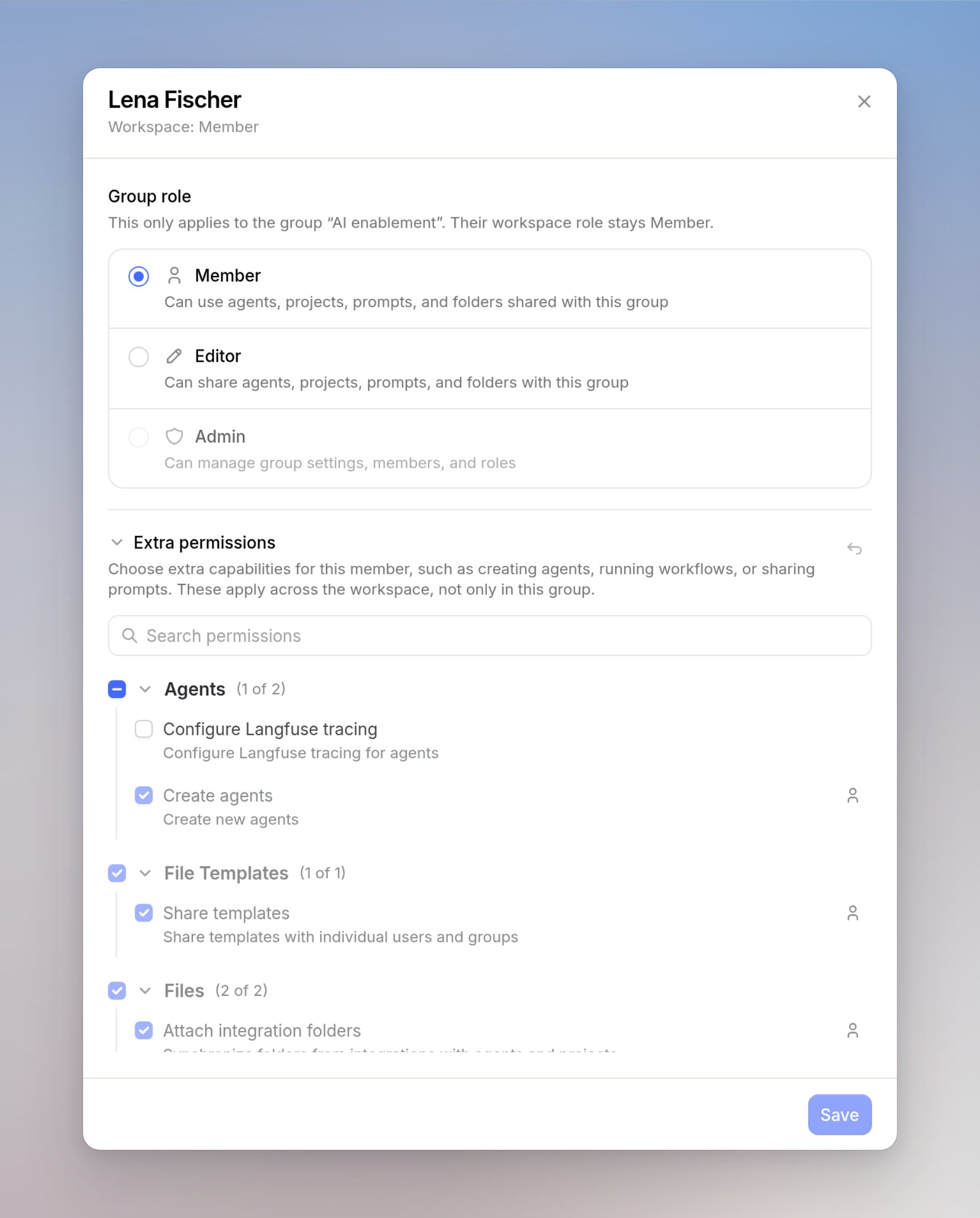
When Max opens the group, he opens a person in it. **Extra permissions** lists the product capabilities he can grant. Those extras then apply across the workspace, not only in the group.
 Keep one of Member, Editor, or Admin. You can add as many custom roles as you like. **Extra permissions** are one-off access on top of their roles.
Rows that already come from a role show **Granted by** that role, **Also in** that role, or **Direct**. If extras get large, you'll see **Use a role instead**. Promoting someone to Admin clears custom roles and extras. **Admin already includes every permission.**
Click **Save** when you are done.
## Group permissions
Workspace roles and extras apply to a person across the workspace. Groups have their own roles. Those are not the same as Member, Editor, or Admin on [**Members**](https://app.langdock.com/settings/workspace/user-management/members).
Open [**Groups**](https://app.langdock.com/settings/workspace/user-management/groups).
### Group roles
Group roles only apply inside that group. They do not open workspace settings.
* Member can use things shared with the group
* Editor can share things with the group
* Admin can do that, plus change group roles and promote people in the group
A group Admin is not a workspace admin.
### Group leader
A group leader is a group Admin with **Grant extra permissions to group members**. They can then grant **Product permissions** to people in that group, such as **Create agents** or **Share templates**.
They can grant only to people in that group. Those product permissions then apply across the workspace, not only in the group.
They cannot open workspace [**Members**](https://app.langdock.com/settings/workspace/user-management/members) or [**Roles**](https://app.langdock.com/settings/workspace/user-management/roles), cannot create custom roles, and cannot assign the workspace Editor or Admin role. They cannot turn a product on or off for the workspace. They can still change group roles.
If a product is already on, they can grant it to people in their group, including expensive ones such as Workflows. Give this only to people you trust with that control.
If you want several people to have the same extras, and you want to take those extras away in one place, use a [custom role](#create-a-custom-role) instead. A group leader can grant the same access again.
You can also grant **View governance** on a group. That opens [Governance](/en/admin/governance/overview) only for resources owned by people in the group. Sharing the group is not enough.
Rows the person already has show **Already from their workspace role**.
### Give a group leader product access
A company of a few hundred people has an AI enablement group. Anna stays workspace admin. Max is in that group. He should grant **Create agents** to people in the group, without billing or workspace settings.
Keep one of Member, Editor, or Admin. You can add as many custom roles as you like. **Extra permissions** are one-off access on top of their roles.
Rows that already come from a role show **Granted by** that role, **Also in** that role, or **Direct**. If extras get large, you'll see **Use a role instead**. Promoting someone to Admin clears custom roles and extras. **Admin already includes every permission.**
Click **Save** when you are done.
## Group permissions
Workspace roles and extras apply to a person across the workspace. Groups have their own roles. Those are not the same as Member, Editor, or Admin on [**Members**](https://app.langdock.com/settings/workspace/user-management/members).
Open [**Groups**](https://app.langdock.com/settings/workspace/user-management/groups).
### Group roles
Group roles only apply inside that group. They do not open workspace settings.
* Member can use things shared with the group
* Editor can share things with the group
* Admin can do that, plus change group roles and promote people in the group
A group Admin is not a workspace admin.
### Group leader
A group leader is a group Admin with **Grant extra permissions to group members**. They can then grant **Product permissions** to people in that group, such as **Create agents** or **Share templates**.
They can grant only to people in that group. Those product permissions then apply across the workspace, not only in the group.
They cannot open workspace [**Members**](https://app.langdock.com/settings/workspace/user-management/members) or [**Roles**](https://app.langdock.com/settings/workspace/user-management/roles), cannot create custom roles, and cannot assign the workspace Editor or Admin role. They cannot turn a product on or off for the workspace. They can still change group roles.
If a product is already on, they can grant it to people in their group, including expensive ones such as Workflows. Give this only to people you trust with that control.
If you want several people to have the same extras, and you want to take those extras away in one place, use a [custom role](#create-a-custom-role) instead. A group leader can grant the same access again.
You can also grant **View governance** on a group. That opens [Governance](/en/admin/governance/overview) only for resources owned by people in the group. Sharing the group is not enough.
Rows the person already has show **Already from their workspace role**.
### Give a group leader product access
A company of a few hundred people has an AI enablement group. Anna stays workspace admin. Max is in that group. He should grant **Create agents** to people in the group, without billing or workspace settings.