> ## Documentation Index
> Fetch the complete documentation index at: https://docs.langdock.com/llms.txt
> Use this file to discover all available pages before exploring further.
# Assistants Completions API
> Erstellt eine Modellantwort für einen bestimmten Assistenten.
**Die Assistants API wird am 16. August eingestellt.**
Für neue Systeme empfehlen wir die [Agents API](/de/developer/agents-api/agent). Die Agents API bietet native Vercel AI SDK Kompatibilität und entfernt benutzerdefinierte Transformationen.
Siehe den [Migrations-Guide](/de/developer/assistants-api/assistant-to-agent-migration) für Details zu den Unterschieden.
Erstellt eine Modellantwort für eine bestimmte Assistenten-ID oder übergibt eine Assistentenkonfiguration, die für deine Anfrage verwendet werden soll.
Um einen Assistenten mit einem API-Schlüssel zu teilen, folge [dieser Anleitung](/de/developer/assistants-api/assistant-api-guide)
## Anfrageparameter
| Parameter | Typ | Erforderlich | Beschreibung |
| ------------- | ------- | -------------------------------------------- | -------------------------------------------------- |
| `assistantId` | string | Eines von assistantId/assistant erforderlich | ID eines vorhandenen Assistenten zur Verwendung |
| `assistant` | object | Eines von assistantId/assistant erforderlich | Konfiguration für einen neuen Assistenten |
| `messages` | array | Ja | Array von Nachrichtenobjekten mit Rolle und Inhalt |
| `stream` | boolean | Nein | Streaming-Antworten aktivieren (Standard: false) |
| `output` | object | Nein | Spezifikation für strukturiertes Ausgabeformat |
### Nachrichtenformat
Jede Nachricht im `messages` Array sollte enthalten:
* `role` (erforderlich) - Eines von: "user", "assistant" oder "tool"
* `content` (erforderlich) - Der Nachrichteninhalt als String
* `attachmentIds` (optional) - Array von UUID-Strings zur Identifizierung von Anhängen für diese Nachricht
### Assistentenkonfiguration
Bei der Erstellung eines temporären Assistenten kannst du Folgendes angeben:
* `name` (erforderlich) - Name des Assistenten (max. 64 Zeichen)
* `instructions` (erforderlich) - Systemanweisungen (max. 16384 Zeichen)
* `description` - Optionale Beschreibung (max. 256 Zeichen)
* `temperature` - Temperatur zwischen 0-1
* `model` - Zu verwendende Modell-ID (siehe [Verfügbare Modelle](/de/developer/assistants-api/assistant-models) für Optionen)
* `capabilities` - Aktivieren von Funktionen wie Websuche und Bilderzeugung
* `actions` - Nutzerdefinierte API-Integrationen
* `vectorDb` - Vektordatenbankverbindungen
* `knowledgeFolderIds` - IDs der zu verwendenden Wissensdatenbanken
* `attachmentIds` - Array von UUID-Strings zur Identifizierung zu verwendender Anhänge
Du kannst eine Liste verfügbarer Modelle mit der [Models
API](/de/developer/assistants-api/assistant-models) abrufen. Dies ist nützlich, wenn du sehen möchtest, welche
Modelle du in deiner Assistentenkonfiguration verwenden kannst.
## Tools über die API verwenden
Wenn ein Assistent Tools konfiguriert hat (in der Langdock-Oberfläche „Actions" genannt), wird er diese automatisch bei API-Anfragen verwenden, wenn es passend ist.
Die Verbindung muss auf „vorausgewählte Verbindung" (mit anderen Nutzern geteilt) gesetzt werden, damit die Tool-Authentifizierung funktioniert.
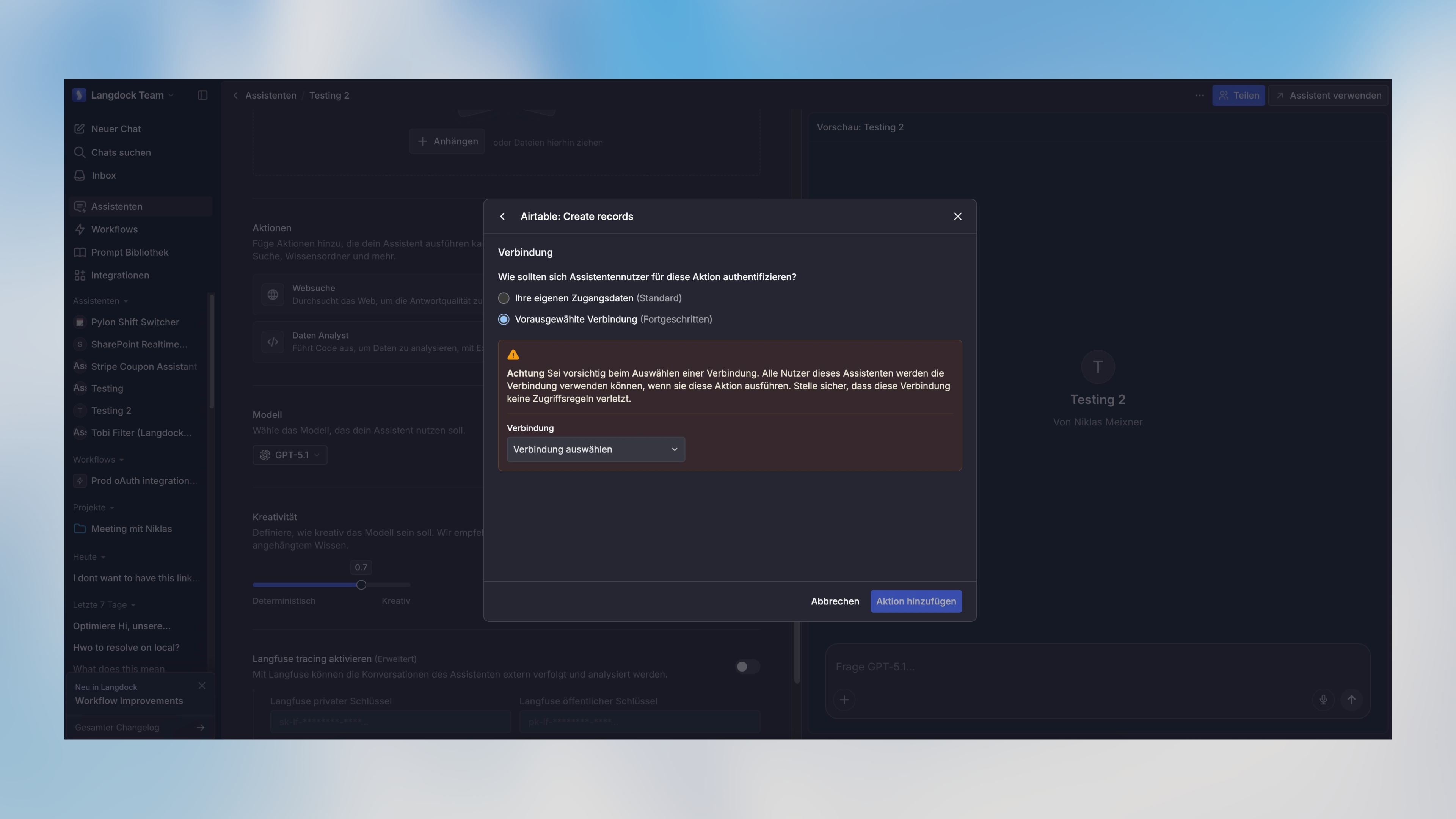 Tools mit aktivierter Option **„Menschliche Bestätigung erforderlich"** funktionieren nicht über die API – sie erfordern eine manuelle Genehmigung in der Langdock-Oberfläche. Um ein Tool über die API zu nutzen, deaktiviere diese Einstellung in der Assistentenkonfiguration.
## Strukturierte Ausgabe
Du kannst ein strukturiertes Ausgabeformat mit dem optionalen `output` Parameter angeben:
| Feld | Typ | Beschreibung |
| -------- | ----------------------------- | --------------------------------------------------------------- |
| `type` | "object" \| "array" \| "enum" | Der Typ der strukturierten Ausgabe |
| `schema` | object | JSON-Schema-Definition für die Ausgabe (für object/array-Typen) |
| `enum` | string\[] | Array erlaubter Werte (für enum-Typ) |
Das Verhalten des `output` Parameters hängt vom angegebenen Typ ab:
* `type: "object"` ohne Schema: Erzwingt, dass die Antwort ein einzelnes JSON-Objekt ist (keine spezifische Struktur)
* `type: "object"` mit Schema: Erzwingt, dass die Antwort dem bereitgestellten JSON-Schema entspricht
* `type: "array"` mit Schema: Erzwingt, dass die Antwort ein Array von Objekten ist, die dem bereitgestellten Schema entsprechen
* `type: "enum"`: Erzwingt, dass die Antwort einer der im `enum` Array angegebenen Werte ist
Du kannst Tools wie [easy-json-schema](https://easy-json-schema.github.io/)
verwenden, um JSON-Schemas aus Beispiel-JSON-Objekten zu generieren.
## Streaming-Antworten
Wenn `stream` auf `true` gesetzt ist, gibt die API einen Stream von Server-Sent Events (SSE) zurück, anstatt auf die vollständige Antwort zu warten. Dies ermöglicht es dir, Antworten progressiv anzuzeigen, während sie generiert werden.
Anfragen ohne Streaming werden nach 100 Sekunden mit einem HTTP 524 Fehler beendet. Wenn dein Assistant Tools ausführt, lange Antworten generiert oder langsamere Modelle verwendet, kann die Anfrage dieses Limit überschreiten. Setze `stream: true`, um die Verbindung offen zu halten und Timeouts zu vermeiden.
### Stream-Format
Jedes Event im Stream folgt dem SSE-Format mit JSON-Daten:
```
data: {"type":"message","content":"Hallo"}
data: {"type":"message","content":" Welt"}
data: {"type":"done"}
```
### Streams in JavaScript verarbeiten
```javascript theme={null}
const response = await fetch('https://api.langdock.com/assistant/v1/chat/completions', {
method: 'POST',
headers: {
'Authorization': 'Bearer YOUR_API_KEY',
'Content-Type': 'application/json',
},
body: JSON.stringify({
assistantId: 'asst_123',
messages: [{ role: 'user', content: 'Hallo' }],
stream: true
}),
});
const reader = response.body.getReader();
const decoder = new TextDecoder();
while (true) {
const { done, value } = await reader.read();
if (done) break;
const chunk = decoder.decode(value);
const lines = chunk.split('\n');
for (const line of lines) {
if (line.startsWith('data: ')) {
const data = JSON.parse(line.slice(6));
if (data.type === 'message') {
process.stdout.write(data.content);
}
}
}
}
```
## Abrufen von Anhangs-IDs
Um Anhänge in deinen Assistentengesprächen zu verwenden, musst du zuerst die Dateien mit der [Upload Attachment API](/de/developer/assistants-api/upload-attachments) hochladen. Dies gibt eine `attachmentId` für jede Datei, die du dann in das `attachmentIds` Array in deiner Assistenten- oder Nachrichtenkonfiguration einfügen kannst.
## Beispiele
### Verwendung eines vorhandenen Assistenten
```javascript theme={null}
const axios = require("axios");
async function chatWithAssistant() {
const response = await axios.post(
"https://api.langdock.com/assistant/v1/chat/completions",
{
assistantId: "asst_123",
messages: [
{
role: "user",
content: "Kannst du dieses Dokument für mich analysieren?",
attachmentIds: ["550e8400-e29b-41d4-a716-446655440000"], // Erhalte attachmentIds vom Upload-Attachment-Endpunkt
},
],
stream: true, // Streaming-Antworten aktivieren
},
{
headers: {
Authorization: "Bearer YOUR_API_KEY",
},
}
);
console.log(response.data.result);
}
```
### Verwendung einer temporären Assistentenkonfiguration
```javascript theme={null}
const axios = require("axios");
async function chatWithNewAssistant() {
const response = await axios.post(
"https://api.langdock.com/assistant/v1/chat/completions",
{
assistant: {
name: "Document Analyzer",
instructions:
"You are a helpful agent who analyzes documents and answers questions about them",
temperature: 0.7,
model: "gpt-5",
capabilities: {
webSearch: true,
},
attachmentIds: ["550e8400-e29b-41d4-a716-446655440000"], // Erhalte attachmentIds vom Upload-Attachment-Endpunkt
},
messages: [
{
role: "user",
content: "What are the key points in the document?",
},
],
},
{
headers: {
Authorization: "Bearer YOUR_API_KEY",
},
}
);
console.log(response.data.result);
}
```
### Verwendung von strukturierter Ausgabe mit Schema (Array)
```javascript theme={null}
const axios = require("axios");
async function getStructuredWeather() {
const response = await axios.post(
"https://api.langdock.com/assistant/v1/chat/completions",
{
assistant: {
name: "Weather Assistant",
instructions: "You are a helpful weather agent",
model: "gpt-5.1",
capabilities: {
webSearch: true,
},
},
messages: [
{
role: "user",
content: "What's the weather in paris, berlin and london today?",
},
],
output: {
type: "array",
schema: {
type: "object",
properties: {
weather: {
type: "object",
properties: {
city: {
type: "string",
},
tempInCelsius: {
type: "number",
},
tempInFahrenheit: {
type: "number",
},
},
required: ["city", "tempInCelsius", "tempInFahrenheit"],
},
},
},
},
},
{
headers: {
Authorization: "Bearer YOUR_API_KEY",
},
}
);
// Access the structured data directly from output
console.log(response.data.output);
// Output:
// [
// { "weather": { "city": "Paris", "tempInCelsius": 1, "tempInFahrenheit": 33 } },
// { "weather": { "city": "Berlin", "tempInCelsius": 1, "tempInFahrenheit": 35 } },
// { "weather": { "city": "London", "tempInCelsius": 7, "tempInFahrenheit": 45 } }
// ]
}
```
### Verwendung von strukturierter Ausgabe mit Schema (Object)
```javascript theme={null}
const axios = require("axios");
async function extractContactInfo() {
const response = await axios.post(
"https://api.langdock.com/assistant/v1/chat/completions",
{
assistant: {
name: "Contact Extractor",
instructions: "You extract contact information from text",
},
messages: [
{
role: "user",
content:
"Extract the contact info: John Smith is our new sales lead. You can reach him at john.smith@example.com or call +1-555-123-4567.",
},
],
output: {
type: "object",
schema: {
type: "object",
properties: {
name: {
type: "string",
},
email: {
type: "string",
},
phone: {
type: "string",
},
role: {
type: "string",
},
},
required: ["name", "email"],
},
},
},
{
headers: {
Authorization: "Bearer YOUR_API_KEY",
},
}
);
// Access the structured data directly from output
console.log(response.data.output);
// Output:
// {
// "name": "John Smith",
// "email": "john.smith@example.com",
// "phone": "+1-555-123-4567",
// "role": "sales lead"
// }
}
```
### Verwendung von strukturierter Ausgabe mit Enum
```javascript theme={null}
const axios = require("axios");
async function getSentimentAnalysis() {
const response = await axios.post(
"https://api.langdock.com/assistant/v1/chat/completions",
{
assistant: {
name: "Sentiment Analyzer",
instructions: "You analyze the sentiment of text",
},
messages: [
{
role: "user",
content:
"How would you rate this review: 'This product exceeded my expectations!'",
},
],
output: {
type: "enum",
enum: ["positive", "neutral", "negative"],
},
},
{
headers: {
Authorization: "Bearer YOUR_API_KEY",
},
}
);
// Access the enum result directly from output
console.log(response.data.output);
// Output: "positive"
}
```
## Rate Limits
Die Rate Limit für den Assistant Completion Endpunkt beträgt **500 RPM (Anfragen pro Minute)** und **60,000 TPM (Token pro Minute)**. Rate Limits werden auf Workspace-Ebene definiert - und nicht auf API-Schlüsselebene. Jedes Modell hat seine eigene Rate Limit. Wenn du deine Rate Limit überschreitest, erhältst du eine `429 Too Many Requests` Antwort.
Bitte beachte, dass die Rate Limits Änderungen unterliegen. Beziehe dich auf diese Dokumentation für die aktuellsten Informationen.
Falls du eine höhere Rate Limit benötigst, kontaktiere uns bitte unter [support@langdock.com](mailto:support@langdock.com).
## Antwortformat
Die API gibt ein Objekt zurück, das Folgendes enthält:
```typescript theme={null}
{
// Standard message results - always present
result: Array<{
id: string;
role: "tool" | "assistant";
content: Array<{
type: string;
toolCallId?: string;
toolName?: string;
result?: object;
args?: object;
text?: string;
}>;
}>;
// Structured output - included by default
output?: object | array | string;
}
```
### Standardergebnis
Das `result` Array enthält den Nachrichtenaustausch zwischen Nutzer und Assistent, einschließlich aller durchgeführten Tool-Aufrufe. Dies ist immer in der Antwort enthalten.
### Strukturierte Ausgabe
Wenn die Anfrage einen `output` Parameter enthält, wird die Antwort automatisch ein `output` Feld mit den formatierten strukturierten Daten enthalten. Der Typ dieses Feldes hängt vom angeforderten Ausgabeformat ab:
* Wenn `output.type` "object" war: Gibt ein JSON-Objekt zurück (mit Schema-Validierung, falls ein Schema bereitgestellt wurde)
* Wenn `output.type` "array" war: Gibt ein Array von Objekten zurück, die dem bereitgestellten Schema entsprechen
* Wenn `output.type` "enum" war: Gibt einen String zurück, der einem der bereitgestellten Enum-Werte entspricht
Zum Beispiel, wenn Wetterdaten mit strukturierter Ausgabe angefordert werden:
```javascript theme={null}
// Request
{
"output": {
"type": "array",
"schema": {
"type": "object",
"properties": {
"weather": {
"type": "object",
"properties": {
"city": { "type": "string" },
"tempInCelsius": { "type": "number" },
"tempInFahrenheit": { "type": "number" }
},
"required": ["city", "tempInCelsius", "tempInFahrenheit"]
}
}
}
}
}
// Response
{
"result": [
// Full conversation including tool calls (e.g., web searches)
{ "role": "assistant", "content": [...], "id": "..." },
{ "role": "tool", "content": [...], "id": "..." },
{ "role": "assistant", "content": "...", "id": "..." }
],
"output": [
{ "weather": { "city": "Paris", "tempInCelsius": 1, "tempInFahrenheit": 33 } },
{ "weather": { "city": "Berlin", "tempInCelsius": 1, "tempInFahrenheit": 35 } },
{ "weather": { "city": "London", "tempInCelsius": 7, "tempInFahrenheit": 45 } }
]
}
```
Das `output` Feld wird automatisch mit den formatierten Ergebnissen basierend auf der Antwort des Assistenten und deiner Schema-Definition gefüllt. Du kannst das direkt in deiner Anwendung verwenden, ohne die vollständige Konversation in `result` parsen zu müssen.
## Fehlerbehandlung
```javascript theme={null}
try {
const response = await axios.post('https://api.langdock.com/assistant/v1/chat/completions', ...);
} catch (error) {
if (error.response) {
switch (error.response.status) {
case 400:
console.error('Invalid parameters:', error.response.data.message);
break;
case 429:
console.error('Rate limit exceeded');
break;
case 500:
console.error('Server error');
break;
}
}
}
```
## Migration zur Agents API
Die neue Agents API bietet verbesserte Kompatibilität mit modernen AI SDKs, einschließlich nativer Unterstützung für das Vercel AI SDK. Der Hauptunterschied liegt im Format des Chat-Completions-Endpunkts.
Siehe den entsprechenden Endpunkt in der Agents API:
* [Agents Completions API](/de/developer/agents-api/agent) - Verwendet das Vercel AI SDK Nachrichtenformat
Langdock blockiert bewusst Browser-basierte Anfragen, um deinen API-Schlüssel zu schützen und die Sicherheit deiner Anwendungen zu gewährleisten. Weitere Informationen findest du in unserem Guide zu [Best Practices für API-Schlüssel](/de/admin/ai-adoption-and-rollout/best-practices/api-key-best-practices).
## OpenAPI
````yaml POST /assistant/v1/chat/completions
openapi: 3.0.0
info:
title: Langdock API
version: 3.0.0
servers:
- url: https://api.langdock.com
description: Production
security:
- bearerAuth: []
paths:
/assistant/v1/chat/completions:
post:
tags:
- Assistant
summary: '[Deprecated] Creates a chat completion with an assistant'
description: >-
This endpoint is deprecated. Please use /agent/v1/chat/completions for
new integrations.
parameters: []
requestBody:
required: true
content:
application/json:
examples:
streamingEnabled:
summary: Request with streaming enabled
value:
assistantId: asst_123
messages:
- role: user
content: Hello, how can you help me?
stream: true
streamingDisabled:
summary: Request with streaming disabled (default)
value:
assistantId: asst_123
messages:
- role: user
content: Hello, how can you help me?
stream: false
defaultBehavior:
summary: Request without stream parameter (defaults to false)
value:
assistantId: asst_123
messages:
- role: user
content: Hello, how can you help me?
schema:
type: object
oneOf:
- type: object
required:
- assistantId
- messages
properties:
assistantId:
type: string
description: ID of an existing agent to use
messages:
type: array
items:
type: object
required:
- role
- content
properties:
role:
type: string
enum:
- user
- assistant
- tool
content:
type: string
attachmentIds:
type: array
items:
type: string
format: uuid
description: >-
Array of UUID strings identifying attachments for
this message
stream:
type: boolean
default: false
description: >-
Enable or disable streaming responses. When true,
returns server-sent events. When false, returns complete
JSON response.
example: true
output:
$ref: '#/components/schemas/StructuredOutputConfig'
maxSteps:
type: integer
minimum: 1
maximum: 20
default: 10
description: >-
Maximum number of steps the agent can take during the
conversation
- type: object
required:
- assistant
- messages
properties:
assistant:
$ref: '#/components/schemas/Assistant'
messages:
type: array
items:
type: object
required:
- role
- content
properties:
role:
type: string
enum:
- user
- assistant
- tool
content:
type: string
attachmentIds:
type: array
items:
type: string
format: uuid
description: >-
Array of UUID strings identifying attachments for
this message
stream:
type: boolean
default: false
description: >-
Enable or disable streaming responses. When true,
returns server-sent events. When false, returns complete
JSON response.
example: true
output:
$ref: '#/components/schemas/StructuredOutputConfig'
maxSteps:
type: integer
minimum: 1
maximum: 20
default: 10
description: >-
Maximum number of steps the agent can take during the
conversation
responses:
'200':
description: Successful chat completion
content:
application/json:
schema:
type: object
required:
- result
properties:
result:
type: array
items:
type: object
required:
- id
- role
- content
properties:
id:
type: string
role:
type: string
enum:
- tool
- assistant
content:
type: array
items:
type: object
required:
- type
properties:
type:
type: string
toolCallId:
type: string
toolName:
type: string
result:
type: object
args:
type: object
text:
type: string
output:
description: Present when output parameter was specified in the request
oneOf:
- type: object
description: When output.type is "object"
- type: array
description: When output.type is "array"
- type: string
description: >-
When output.type is "enum" (one of the provided enum
values)
text/event-stream:
schema:
type: string
description: Server-sent events stream when stream=true
'400':
description: Invalid request parameters
content:
application/json:
schema:
type: object
properties:
message:
oneOf:
- type: string
- type: array
items:
type: object
'429':
description: Rate limit exceeded
content:
application/json:
schema:
type: object
properties:
message:
type: string
'500':
description: Internal server error
content:
application/json:
schema:
type: object
properties:
message:
type: string
deprecated: true
components:
schemas:
StructuredOutputConfig:
type: object
description: >-
Specification for structured output format. When type is object/array
and no schema is provided, the response will be JSON but can have any
structure. When the type is enum, you must provide an enum parameter
with an array of strings as options.
properties:
type:
type: string
enum:
- object
- array
- enum
description: The type of structured output
schema:
type: object
description: >-
JSON Schema definition for the output (required for object/array
types with specific structure). Search for "JSON to JSON Schema" in
the web to find a tool to convert any JSON into the required JSON
Schema format.
enum:
type: array
items:
type: string
description: >-
Array of allowed values (required for enum type). Values must be of
type string.
oneOf:
- properties:
type:
enum:
- enum
enum:
type: array
items:
type: string
- properties:
type:
enum:
- object
- array
schema:
type: object
- properties:
type:
enum:
- object
- array
Assistant:
type: object
required:
- name
- instructions
properties:
name:
type: string
maxLength: 64
description:
type: string
maxLength: 256
instructions:
type: string
maxLength: 16384
temperature:
type: number
minimum: 0
maximum: 1
model:
type: string
maxLength: 64
capabilities:
type: object
properties:
webSearch:
type: boolean
dataAnalyst:
type: boolean
deprecated: true
description: Deprecated. Accepted for compatibility and ignored.
imageGeneration:
type: boolean
actions:
type: array
items: 7d19e95b-21e8-417f-995e-24a8f5651c16
vectorDb:
type: array
items: 48adcef5-fb6f-434d-894d-ad23cdeb3651
knowledgeFolderIds:
type: array
items:
type: string
attachmentIds:
type: array
items:
type: string
format: uuid
description: Array of UUID strings identifying attachments for this message
securitySchemes:
bearerAuth:
type: http
scheme: bearer
bearerFormat: API Key
description: API key as Bearer token. Format "Bearer YOUR_API_KEY"
````
Tools mit aktivierter Option **„Menschliche Bestätigung erforderlich"** funktionieren nicht über die API – sie erfordern eine manuelle Genehmigung in der Langdock-Oberfläche. Um ein Tool über die API zu nutzen, deaktiviere diese Einstellung in der Assistentenkonfiguration.
## Strukturierte Ausgabe
Du kannst ein strukturiertes Ausgabeformat mit dem optionalen `output` Parameter angeben:
| Feld | Typ | Beschreibung |
| -------- | ----------------------------- | --------------------------------------------------------------- |
| `type` | "object" \| "array" \| "enum" | Der Typ der strukturierten Ausgabe |
| `schema` | object | JSON-Schema-Definition für die Ausgabe (für object/array-Typen) |
| `enum` | string\[] | Array erlaubter Werte (für enum-Typ) |
Das Verhalten des `output` Parameters hängt vom angegebenen Typ ab:
* `type: "object"` ohne Schema: Erzwingt, dass die Antwort ein einzelnes JSON-Objekt ist (keine spezifische Struktur)
* `type: "object"` mit Schema: Erzwingt, dass die Antwort dem bereitgestellten JSON-Schema entspricht
* `type: "array"` mit Schema: Erzwingt, dass die Antwort ein Array von Objekten ist, die dem bereitgestellten Schema entsprechen
* `type: "enum"`: Erzwingt, dass die Antwort einer der im `enum` Array angegebenen Werte ist
Du kannst Tools wie [easy-json-schema](https://easy-json-schema.github.io/)
verwenden, um JSON-Schemas aus Beispiel-JSON-Objekten zu generieren.
## Streaming-Antworten
Wenn `stream` auf `true` gesetzt ist, gibt die API einen Stream von Server-Sent Events (SSE) zurück, anstatt auf die vollständige Antwort zu warten. Dies ermöglicht es dir, Antworten progressiv anzuzeigen, während sie generiert werden.
Anfragen ohne Streaming werden nach 100 Sekunden mit einem HTTP 524 Fehler beendet. Wenn dein Assistant Tools ausführt, lange Antworten generiert oder langsamere Modelle verwendet, kann die Anfrage dieses Limit überschreiten. Setze `stream: true`, um die Verbindung offen zu halten und Timeouts zu vermeiden.
### Stream-Format
Jedes Event im Stream folgt dem SSE-Format mit JSON-Daten:
```
data: {"type":"message","content":"Hallo"}
data: {"type":"message","content":" Welt"}
data: {"type":"done"}
```
### Streams in JavaScript verarbeiten
```javascript theme={null}
const response = await fetch('https://api.langdock.com/assistant/v1/chat/completions', {
method: 'POST',
headers: {
'Authorization': 'Bearer YOUR_API_KEY',
'Content-Type': 'application/json',
},
body: JSON.stringify({
assistantId: 'asst_123',
messages: [{ role: 'user', content: 'Hallo' }],
stream: true
}),
});
const reader = response.body.getReader();
const decoder = new TextDecoder();
while (true) {
const { done, value } = await reader.read();
if (done) break;
const chunk = decoder.decode(value);
const lines = chunk.split('\n');
for (const line of lines) {
if (line.startsWith('data: ')) {
const data = JSON.parse(line.slice(6));
if (data.type === 'message') {
process.stdout.write(data.content);
}
}
}
}
```
## Abrufen von Anhangs-IDs
Um Anhänge in deinen Assistentengesprächen zu verwenden, musst du zuerst die Dateien mit der [Upload Attachment API](/de/developer/assistants-api/upload-attachments) hochladen. Dies gibt eine `attachmentId` für jede Datei, die du dann in das `attachmentIds` Array in deiner Assistenten- oder Nachrichtenkonfiguration einfügen kannst.
## Beispiele
### Verwendung eines vorhandenen Assistenten
```javascript theme={null}
const axios = require("axios");
async function chatWithAssistant() {
const response = await axios.post(
"https://api.langdock.com/assistant/v1/chat/completions",
{
assistantId: "asst_123",
messages: [
{
role: "user",
content: "Kannst du dieses Dokument für mich analysieren?",
attachmentIds: ["550e8400-e29b-41d4-a716-446655440000"], // Erhalte attachmentIds vom Upload-Attachment-Endpunkt
},
],
stream: true, // Streaming-Antworten aktivieren
},
{
headers: {
Authorization: "Bearer YOUR_API_KEY",
},
}
);
console.log(response.data.result);
}
```
### Verwendung einer temporären Assistentenkonfiguration
```javascript theme={null}
const axios = require("axios");
async function chatWithNewAssistant() {
const response = await axios.post(
"https://api.langdock.com/assistant/v1/chat/completions",
{
assistant: {
name: "Document Analyzer",
instructions:
"You are a helpful agent who analyzes documents and answers questions about them",
temperature: 0.7,
model: "gpt-5",
capabilities: {
webSearch: true,
},
attachmentIds: ["550e8400-e29b-41d4-a716-446655440000"], // Erhalte attachmentIds vom Upload-Attachment-Endpunkt
},
messages: [
{
role: "user",
content: "What are the key points in the document?",
},
],
},
{
headers: {
Authorization: "Bearer YOUR_API_KEY",
},
}
);
console.log(response.data.result);
}
```
### Verwendung von strukturierter Ausgabe mit Schema (Array)
```javascript theme={null}
const axios = require("axios");
async function getStructuredWeather() {
const response = await axios.post(
"https://api.langdock.com/assistant/v1/chat/completions",
{
assistant: {
name: "Weather Assistant",
instructions: "You are a helpful weather agent",
model: "gpt-5.1",
capabilities: {
webSearch: true,
},
},
messages: [
{
role: "user",
content: "What's the weather in paris, berlin and london today?",
},
],
output: {
type: "array",
schema: {
type: "object",
properties: {
weather: {
type: "object",
properties: {
city: {
type: "string",
},
tempInCelsius: {
type: "number",
},
tempInFahrenheit: {
type: "number",
},
},
required: ["city", "tempInCelsius", "tempInFahrenheit"],
},
},
},
},
},
{
headers: {
Authorization: "Bearer YOUR_API_KEY",
},
}
);
// Access the structured data directly from output
console.log(response.data.output);
// Output:
// [
// { "weather": { "city": "Paris", "tempInCelsius": 1, "tempInFahrenheit": 33 } },
// { "weather": { "city": "Berlin", "tempInCelsius": 1, "tempInFahrenheit": 35 } },
// { "weather": { "city": "London", "tempInCelsius": 7, "tempInFahrenheit": 45 } }
// ]
}
```
### Verwendung von strukturierter Ausgabe mit Schema (Object)
```javascript theme={null}
const axios = require("axios");
async function extractContactInfo() {
const response = await axios.post(
"https://api.langdock.com/assistant/v1/chat/completions",
{
assistant: {
name: "Contact Extractor",
instructions: "You extract contact information from text",
},
messages: [
{
role: "user",
content:
"Extract the contact info: John Smith is our new sales lead. You can reach him at john.smith@example.com or call +1-555-123-4567.",
},
],
output: {
type: "object",
schema: {
type: "object",
properties: {
name: {
type: "string",
},
email: {
type: "string",
},
phone: {
type: "string",
},
role: {
type: "string",
},
},
required: ["name", "email"],
},
},
},
{
headers: {
Authorization: "Bearer YOUR_API_KEY",
},
}
);
// Access the structured data directly from output
console.log(response.data.output);
// Output:
// {
// "name": "John Smith",
// "email": "john.smith@example.com",
// "phone": "+1-555-123-4567",
// "role": "sales lead"
// }
}
```
### Verwendung von strukturierter Ausgabe mit Enum
```javascript theme={null}
const axios = require("axios");
async function getSentimentAnalysis() {
const response = await axios.post(
"https://api.langdock.com/assistant/v1/chat/completions",
{
assistant: {
name: "Sentiment Analyzer",
instructions: "You analyze the sentiment of text",
},
messages: [
{
role: "user",
content:
"How would you rate this review: 'This product exceeded my expectations!'",
},
],
output: {
type: "enum",
enum: ["positive", "neutral", "negative"],
},
},
{
headers: {
Authorization: "Bearer YOUR_API_KEY",
},
}
);
// Access the enum result directly from output
console.log(response.data.output);
// Output: "positive"
}
```
## Rate Limits
Die Rate Limit für den Assistant Completion Endpunkt beträgt **500 RPM (Anfragen pro Minute)** und **60,000 TPM (Token pro Minute)**. Rate Limits werden auf Workspace-Ebene definiert - und nicht auf API-Schlüsselebene. Jedes Modell hat seine eigene Rate Limit. Wenn du deine Rate Limit überschreitest, erhältst du eine `429 Too Many Requests` Antwort.
Bitte beachte, dass die Rate Limits Änderungen unterliegen. Beziehe dich auf diese Dokumentation für die aktuellsten Informationen.
Falls du eine höhere Rate Limit benötigst, kontaktiere uns bitte unter [support@langdock.com](mailto:support@langdock.com).
## Antwortformat
Die API gibt ein Objekt zurück, das Folgendes enthält:
```typescript theme={null}
{
// Standard message results - always present
result: Array<{
id: string;
role: "tool" | "assistant";
content: Array<{
type: string;
toolCallId?: string;
toolName?: string;
result?: object;
args?: object;
text?: string;
}>;
}>;
// Structured output - included by default
output?: object | array | string;
}
```
### Standardergebnis
Das `result` Array enthält den Nachrichtenaustausch zwischen Nutzer und Assistent, einschließlich aller durchgeführten Tool-Aufrufe. Dies ist immer in der Antwort enthalten.
### Strukturierte Ausgabe
Wenn die Anfrage einen `output` Parameter enthält, wird die Antwort automatisch ein `output` Feld mit den formatierten strukturierten Daten enthalten. Der Typ dieses Feldes hängt vom angeforderten Ausgabeformat ab:
* Wenn `output.type` "object" war: Gibt ein JSON-Objekt zurück (mit Schema-Validierung, falls ein Schema bereitgestellt wurde)
* Wenn `output.type` "array" war: Gibt ein Array von Objekten zurück, die dem bereitgestellten Schema entsprechen
* Wenn `output.type` "enum" war: Gibt einen String zurück, der einem der bereitgestellten Enum-Werte entspricht
Zum Beispiel, wenn Wetterdaten mit strukturierter Ausgabe angefordert werden:
```javascript theme={null}
// Request
{
"output": {
"type": "array",
"schema": {
"type": "object",
"properties": {
"weather": {
"type": "object",
"properties": {
"city": { "type": "string" },
"tempInCelsius": { "type": "number" },
"tempInFahrenheit": { "type": "number" }
},
"required": ["city", "tempInCelsius", "tempInFahrenheit"]
}
}
}
}
}
// Response
{
"result": [
// Full conversation including tool calls (e.g., web searches)
{ "role": "assistant", "content": [...], "id": "..." },
{ "role": "tool", "content": [...], "id": "..." },
{ "role": "assistant", "content": "...", "id": "..." }
],
"output": [
{ "weather": { "city": "Paris", "tempInCelsius": 1, "tempInFahrenheit": 33 } },
{ "weather": { "city": "Berlin", "tempInCelsius": 1, "tempInFahrenheit": 35 } },
{ "weather": { "city": "London", "tempInCelsius": 7, "tempInFahrenheit": 45 } }
]
}
```
Das `output` Feld wird automatisch mit den formatierten Ergebnissen basierend auf der Antwort des Assistenten und deiner Schema-Definition gefüllt. Du kannst das direkt in deiner Anwendung verwenden, ohne die vollständige Konversation in `result` parsen zu müssen.
## Fehlerbehandlung
```javascript theme={null}
try {
const response = await axios.post('https://api.langdock.com/assistant/v1/chat/completions', ...);
} catch (error) {
if (error.response) {
switch (error.response.status) {
case 400:
console.error('Invalid parameters:', error.response.data.message);
break;
case 429:
console.error('Rate limit exceeded');
break;
case 500:
console.error('Server error');
break;
}
}
}
```
## Migration zur Agents API
Die neue Agents API bietet verbesserte Kompatibilität mit modernen AI SDKs, einschließlich nativer Unterstützung für das Vercel AI SDK. Der Hauptunterschied liegt im Format des Chat-Completions-Endpunkts.
Siehe den entsprechenden Endpunkt in der Agents API:
* [Agents Completions API](/de/developer/agents-api/agent) - Verwendet das Vercel AI SDK Nachrichtenformat
Langdock blockiert bewusst Browser-basierte Anfragen, um deinen API-Schlüssel zu schützen und die Sicherheit deiner Anwendungen zu gewährleisten. Weitere Informationen findest du in unserem Guide zu [Best Practices für API-Schlüssel](/de/admin/ai-adoption-and-rollout/best-practices/api-key-best-practices).
## OpenAPI
````yaml POST /assistant/v1/chat/completions
openapi: 3.0.0
info:
title: Langdock API
version: 3.0.0
servers:
- url: https://api.langdock.com
description: Production
security:
- bearerAuth: []
paths:
/assistant/v1/chat/completions:
post:
tags:
- Assistant
summary: '[Deprecated] Creates a chat completion with an assistant'
description: >-
This endpoint is deprecated. Please use /agent/v1/chat/completions for
new integrations.
parameters: []
requestBody:
required: true
content:
application/json:
examples:
streamingEnabled:
summary: Request with streaming enabled
value:
assistantId: asst_123
messages:
- role: user
content: Hello, how can you help me?
stream: true
streamingDisabled:
summary: Request with streaming disabled (default)
value:
assistantId: asst_123
messages:
- role: user
content: Hello, how can you help me?
stream: false
defaultBehavior:
summary: Request without stream parameter (defaults to false)
value:
assistantId: asst_123
messages:
- role: user
content: Hello, how can you help me?
schema:
type: object
oneOf:
- type: object
required:
- assistantId
- messages
properties:
assistantId:
type: string
description: ID of an existing agent to use
messages:
type: array
items:
type: object
required:
- role
- content
properties:
role:
type: string
enum:
- user
- assistant
- tool
content:
type: string
attachmentIds:
type: array
items:
type: string
format: uuid
description: >-
Array of UUID strings identifying attachments for
this message
stream:
type: boolean
default: false
description: >-
Enable or disable streaming responses. When true,
returns server-sent events. When false, returns complete
JSON response.
example: true
output:
$ref: '#/components/schemas/StructuredOutputConfig'
maxSteps:
type: integer
minimum: 1
maximum: 20
default: 10
description: >-
Maximum number of steps the agent can take during the
conversation
- type: object
required:
- assistant
- messages
properties:
assistant:
$ref: '#/components/schemas/Assistant'
messages:
type: array
items:
type: object
required:
- role
- content
properties:
role:
type: string
enum:
- user
- assistant
- tool
content:
type: string
attachmentIds:
type: array
items:
type: string
format: uuid
description: >-
Array of UUID strings identifying attachments for
this message
stream:
type: boolean
default: false
description: >-
Enable or disable streaming responses. When true,
returns server-sent events. When false, returns complete
JSON response.
example: true
output:
$ref: '#/components/schemas/StructuredOutputConfig'
maxSteps:
type: integer
minimum: 1
maximum: 20
default: 10
description: >-
Maximum number of steps the agent can take during the
conversation
responses:
'200':
description: Successful chat completion
content:
application/json:
schema:
type: object
required:
- result
properties:
result:
type: array
items:
type: object
required:
- id
- role
- content
properties:
id:
type: string
role:
type: string
enum:
- tool
- assistant
content:
type: array
items:
type: object
required:
- type
properties:
type:
type: string
toolCallId:
type: string
toolName:
type: string
result:
type: object
args:
type: object
text:
type: string
output:
description: Present when output parameter was specified in the request
oneOf:
- type: object
description: When output.type is "object"
- type: array
description: When output.type is "array"
- type: string
description: >-
When output.type is "enum" (one of the provided enum
values)
text/event-stream:
schema:
type: string
description: Server-sent events stream when stream=true
'400':
description: Invalid request parameters
content:
application/json:
schema:
type: object
properties:
message:
oneOf:
- type: string
- type: array
items:
type: object
'429':
description: Rate limit exceeded
content:
application/json:
schema:
type: object
properties:
message:
type: string
'500':
description: Internal server error
content:
application/json:
schema:
type: object
properties:
message:
type: string
deprecated: true
components:
schemas:
StructuredOutputConfig:
type: object
description: >-
Specification for structured output format. When type is object/array
and no schema is provided, the response will be JSON but can have any
structure. When the type is enum, you must provide an enum parameter
with an array of strings as options.
properties:
type:
type: string
enum:
- object
- array
- enum
description: The type of structured output
schema:
type: object
description: >-
JSON Schema definition for the output (required for object/array
types with specific structure). Search for "JSON to JSON Schema" in
the web to find a tool to convert any JSON into the required JSON
Schema format.
enum:
type: array
items:
type: string
description: >-
Array of allowed values (required for enum type). Values must be of
type string.
oneOf:
- properties:
type:
enum:
- enum
enum:
type: array
items:
type: string
- properties:
type:
enum:
- object
- array
schema:
type: object
- properties:
type:
enum:
- object
- array
Assistant:
type: object
required:
- name
- instructions
properties:
name:
type: string
maxLength: 64
description:
type: string
maxLength: 256
instructions:
type: string
maxLength: 16384
temperature:
type: number
minimum: 0
maximum: 1
model:
type: string
maxLength: 64
capabilities:
type: object
properties:
webSearch:
type: boolean
dataAnalyst:
type: boolean
deprecated: true
description: Deprecated. Accepted for compatibility and ignored.
imageGeneration:
type: boolean
actions:
type: array
items: 7d19e95b-21e8-417f-995e-24a8f5651c16
vectorDb:
type: array
items: 48adcef5-fb6f-434d-894d-ad23cdeb3651
knowledgeFolderIds:
type: array
items:
type: string
attachmentIds:
type: array
items:
type: string
format: uuid
description: Array of UUID strings identifying attachments for this message
securitySchemes:
bearerAuth:
type: http
scheme: bearer
bearerFormat: API Key
description: API key as Bearer token. Format "Bearer YOUR_API_KEY"
````